Wget with Proxy Setup Made Simple and Reliable
Learn wget with proxy setup for HTTP, HTTPS and SOCKS. See env vars, .wgetrc, auth, chaining and fixes with real examples.
Dalvo · September 14, 2026
You're on a corporate network, and the same wget command that worked at home now hangs, returns a connection error, or reaches the wrong gateway. You export a proxy variable, run the command again, and nothing changes. In a CI runner or container, the result can be even less predictable because inherited environment variables and configuration files differ from your interactive shell.
The problem usually isn't the download URL. Wget with proxy relies on several configuration layers, including environment variables, startup files, command-line overrides, and the no_proxy bypass list. Once those layers conflict, Wget can appear to ignore a proxy even when the proxy setting is present. The GNU Wget proxy documentation describes this model directly, including support for HTTP and FTP retrievals.
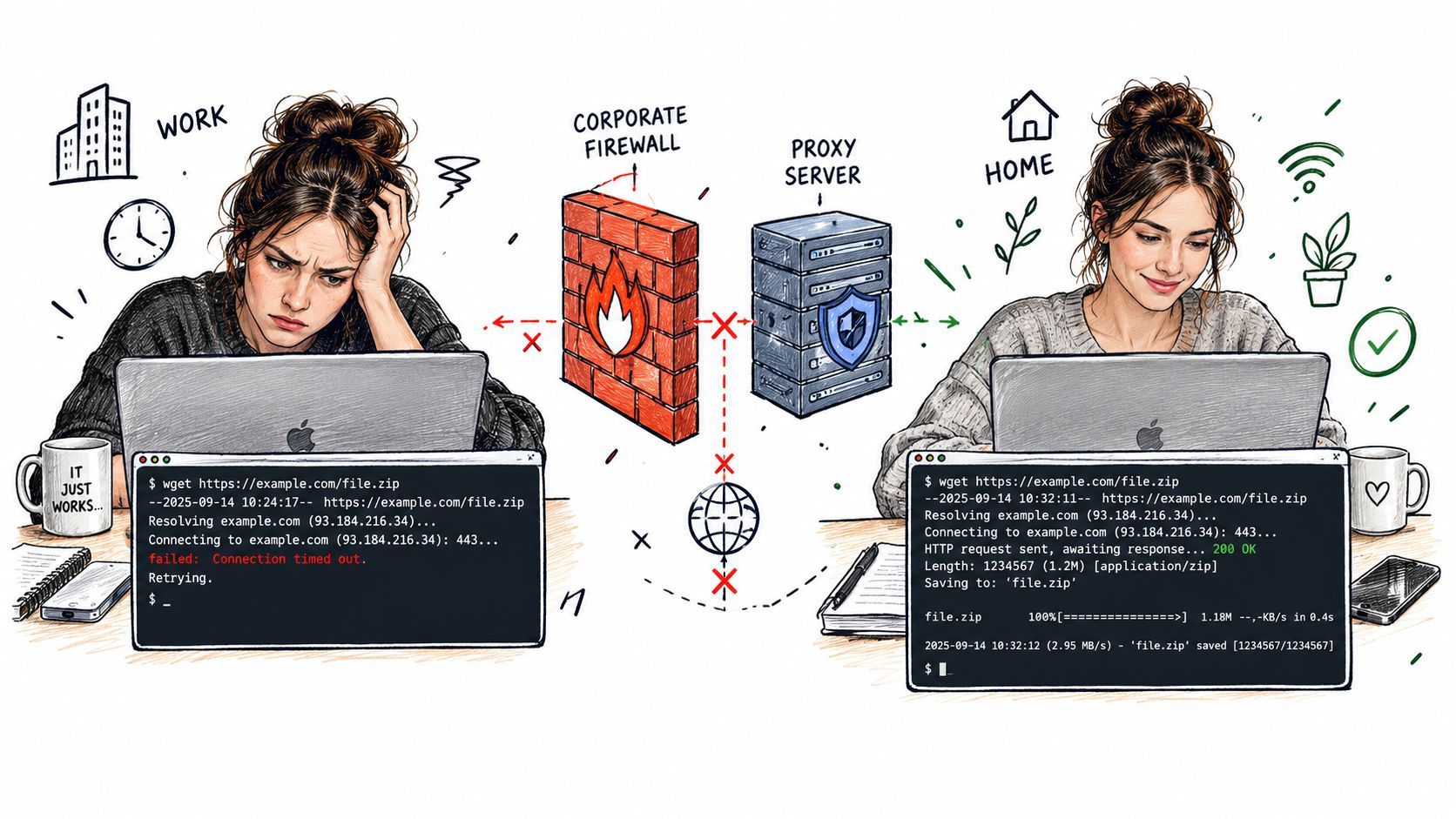
This guide focuses on the parts that cause production failures: precedence, authentication, HTTPS tunneling, bypass rules, cron and container environments, and the limits of SOCKS and enterprise gateways. The goal isn't to memorize one export command. It's to know which layer supplied the setting, which layer overrode it, and how to prove the route Wget used.
Table of Contents
- Why Wget Ignores Your Proxy When You Need It Most
- How Wget Finds and Uses Your Proxy Settings
- Authenticated and SOCKS Proxies With Real Examples
- Persistent Config Tunneling and Proxy Chaining Options
- Debugging Common Wget Proxy Errors and Fixes
- Secure Habits and When to Use a Proxy Abstracting Service
Why Wget Ignores Your Proxy When You Need It Most
A common incident starts with a simple assumption. The workstation has internet access, so a download should work. Behind a company firewall, however, direct outbound connections may be blocked while approved traffic must pass through an HTTP proxy. Wget starts, tries the destination directly, and eventually fails because no proxy route was selected.
The operator then runs a command such as export http_proxy=... and tries again. It works in the terminal, but the scheduled job still fails. Or HTTP downloads use the gateway while HTTPS requests take a different path. In another environment, an internal hostname bypasses the proxy because no_proxy includes the company domain.
Practical rule: Treat proxy selection as configuration resolution, not as a single command-line switch.
Wget's proxy support is built into the tool rather than supplied by a separate proxy plugin. The standard environment variables are http_proxy, https_proxy, and ftp_proxy, with no_proxy available for destinations that should bypass the gateway, as documented in the official GNU Wget manual. Startup-file directives such as use_proxy, proxy = on/off, and protocol-specific entries can also change behavior.
That design is useful because a shell, user account, or job can control routing without modifying the download command itself. It also creates failure modes. A user-level ~/.wgetrc can affect an apparently clean command, a command-line --no-proxy can suppress an enterprise route, and a scheduled process may not inherit the same environment as an interactive shell.
The proxy types that matter
An unauthenticated HTTP proxy is the easiest case. Wget sends the request through the configured gateway, and the gateway handles the outbound connection. HTTPS downloads can also use an HTTP proxy through the CONNECT-style tunneling behavior supported by the proxy, but the proxy must permit that destination and method.
Authenticated gateways add another boundary. Wget provides --proxy-user and --proxy-password, while older GNU documentation describes those credentials as being encoded with Basic authentication. That works only when the gateway accepts the authentication method Wget can provide. A corporate proxy requiring NTLM or a custom scheme can reject the request with 407 Proxy Authentication Required, even when the username and password are correct. The GNU Wget authentication documentation is useful for understanding this limitation.
SOCKS is a separate consideration. Don't assume that a proxy URL alone guarantees SOCKS compatibility in every Wget build or workflow. If the network requires SOCKS-specific behavior, verify the installed Wget capabilities and consider whether another client is a better fit.
Why “works on my machine” persists
Interactive shells load profile files, while cron jobs often run with a smaller environment. Containers may receive proxy variables at runtime but still contain a user .wgetrc copied into the image. CI systems can inject variables at the runner level, the job level, or the step level.
That's why reliable diagnosis starts by identifying every possible input. Check the environment, inspect the applicable Wget configuration, review command-line options, and then examine no_proxy. Only after that should you investigate firewall rules or proxy availability.
How Wget Finds and Uses Your Proxy Settings
Wget can receive proxy instructions from three practical places: the shell environment, startup configuration, and the command line. The GNU manual documents the protocol variables and the configuration directives, including http_proxy, https_proxy, ftp_proxy, no_proxy, use_proxy, and per-protocol settings. Each location serves a different operational purpose.
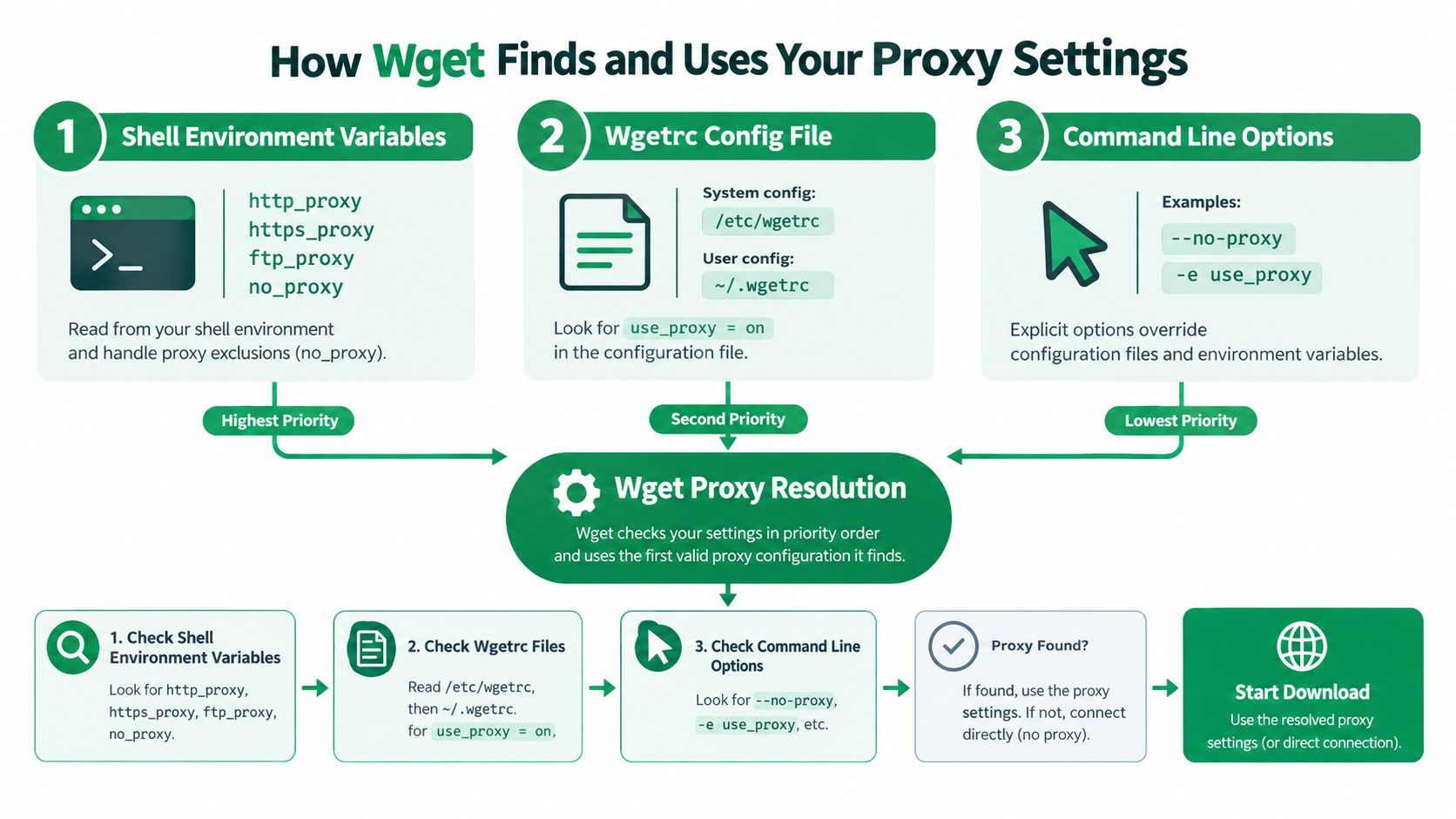
Environment variables for sessions and jobs
For a shell session, set the variables before invoking Wget:
export http_proxy=http://proxy.example.test:8080
export https_proxy=http://proxy.example.test:8080
export ftp_proxy=http://proxy.example.test:8080
export no_proxy=localhost,127.0.0.1,.internal.example
The values above are illustrative configuration syntax, not a universal gateway address. Replace them with the route provided by your network team.
Use http_proxy for HTTP retrievals, https_proxy for HTTPS retrievals, and ftp_proxy for FTP retrievals. no_proxy defines destinations that should be contacted directly. A bypass entry can be appropriate for loopback services or internal domains, but an overly broad entry can make Wget appear to ignore the proxy.
Environment variables are convenient for containers and CI because the job definition can inject them without editing the image or repository. They're also temporary when exported in a shell, which makes them suitable for testing. Remember that variable names and shell behavior can differ across tools and platforms. Check the exact variables visible to the process that launches Wget, not just the ones visible in your own terminal.
~/.wgetrc for repeatable user settings
For a user-specific configuration, place directives in ~/.wgetrc:
use_proxy = on
http_proxy =
https_proxy =
ftp_proxy =
no_proxy = localhost,127.0.0.1,.internal.example
A system startup file can also provide defaults, while the user file lets an individual account adjust them without changing system policy. This is useful on a long-lived server where several scripts should share the same routing behavior.
The drawback is visibility. A command can look like it has no proxy options while still inheriting settings from ~/.wgetrc. When troubleshooting, inspect both system and user configuration locations and check the output of wget --version for the configured Wgetrc paths.
Inline options for isolated commands
For a one-off job, use Wget's execute option:
wget -e use_proxy=on -e http_proxy=http://proxy.example.test:8080
You can disable proxy use for a particular invocation with:
wget --no-proxy
Inline settings keep a test self-contained, but they can expose credentials if you place them directly in the command. They also make scripts harder to maintain when gateway policy changes. Use them to isolate behavior during diagnosis, then move stable non-secret policy to the environment or configuration file.
The important precedence lesson is simple. A setting can exist and still not control the request. A bypass list, explicit disablement, or later command-line instruction may win over a default inherited from the environment or startup file.
Authenticated and SOCKS Proxies With Real Examples
Authentication failures often look like network failures because the destination never receives a usable request. Start with the simplest route, then add credentials only after you've confirmed that the proxy host and port accept unauthenticated traffic.
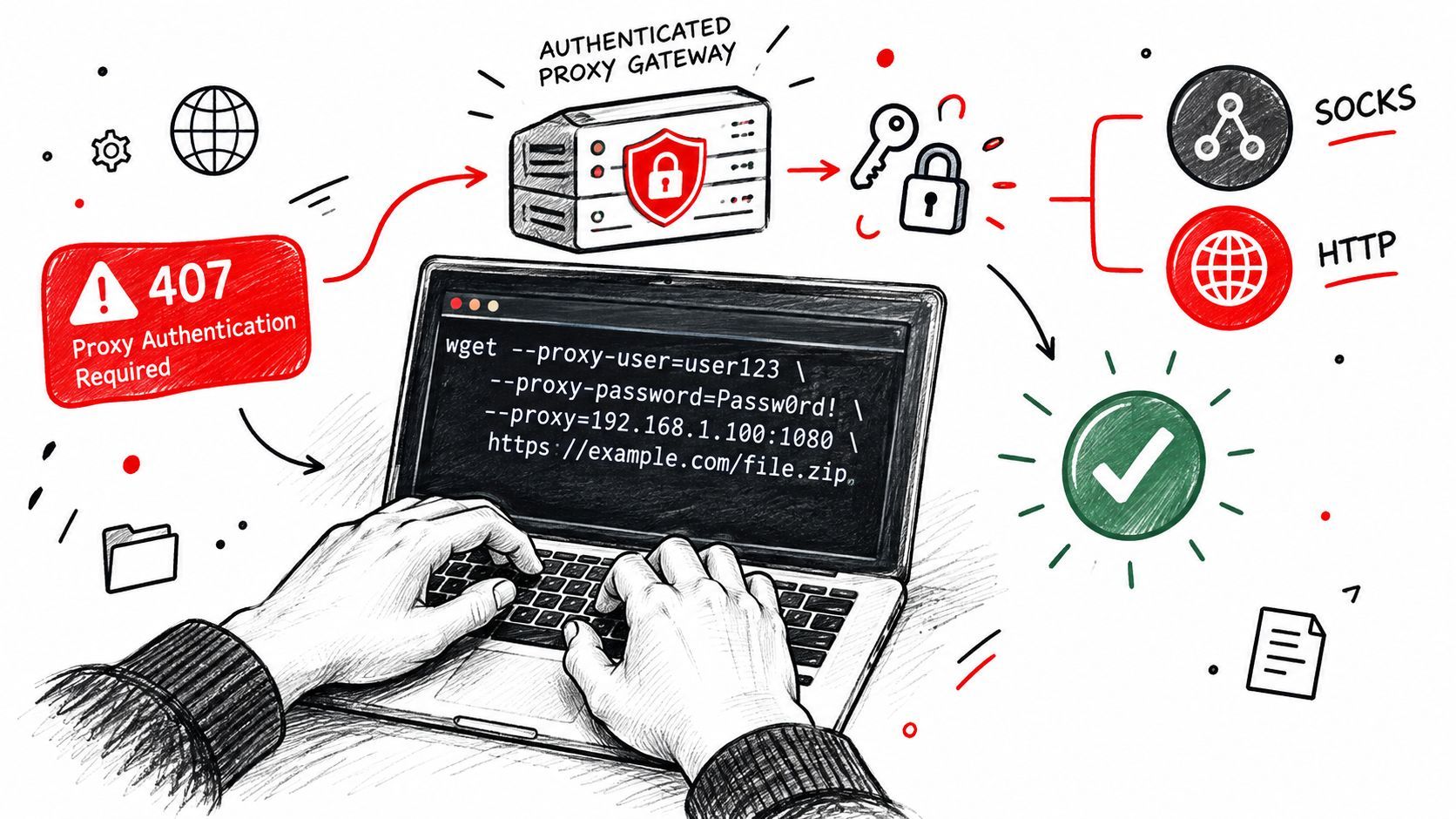
First test a plain proxy configuration:
wget -e use_proxy=on \
     -e http_proxy=http://proxy.example.test:8080 \
If that fails with a connection refusal or timeout, adding credentials won't fix the transport path. Confirm the gateway address, port, firewall policy, and whether the proxy permits the requested destination.
Basic proxy credentials
When the gateway accepts the authentication method Wget supports, pass credentials with the dedicated options:
wget -e use_proxy=on \
     -e http_proxy=http://proxy.example.test:8080 \
     --proxy-user="$PROXY_USER" \
     --proxy-password="$PROXY_PASSWORD" \
Using shell variables avoids placing the literal password in the command text, but the variables still need secure handling. A password passed as a command argument may be visible through process inspection on some systems, and shell history can preserve a literal value if you type it directly.
For a repeatable user configuration, Wget also supports proxy directives in ~/.wgetrc:
use_proxy = on
http_proxy =
https_proxy =
Keep secrets out of shared repositories and restrict access to files that contain credentials. A configuration file is convenient, but it isn't automatically a secret store.
Authentication boundary: Correct credentials don't help when the proxy requires NTLM or a custom gateway scheme that plain Wget doesn't natively handle.
A 407 Proxy Authentication Required response usually means the proxy requested authentication and did not accept the supplied response. Check the username, password, proxy URL, and credential encoding first. Then ask the network administrator which authentication scheme the gateway requires. If it expects NTLM, Kerberos, or a proprietary challenge flow, use an approved intermediary or a client designed for that gateway rather than repeatedly changing the password.
This video can help visualize the command-line setup while you compare it with your gateway's policy:
HTTPS and SOCKS decisions
An HTTP proxy can carry an HTTPS download when it supports the required tunnel. Configure the appropriate protocol variable:
export https_proxy=http://proxy.example.test:8080
wget
The URL scheme in the proxy setting describes the proxy connection, not necessarily the destination protocol. Your gateway may impose its own certificate inspection or access policy, so a successful TCP connection doesn't guarantee that TLS negotiation will be accepted.
SOCKS requires more care. Wget workflows should use only a SOCKS mode supported by the installed build and documented for that environment. If the binary doesn't provide the required SOCKS behavior, switching variable names won't create it. In that case, use a SOCKS-capable client or a local adapter that exposes an HTTP proxy interface to Wget.
Persistent Config Tunneling and Proxy Chaining Options
The right configuration depends on how long the job lives and who should control routing. A temporary CI step shouldn't inherit a developer's personal .wgetrc, while a managed server may benefit from a stable user configuration. Proxy settings should be explicit at the boundary where the job starts.
| Method | Scope | Best For | Watch Out |
|---|---|---|---|
-e inline options | One command | Isolated tests and ephemeral jobs | Long commands, accidental secret exposure |
| Exported environment variables | Shell, container, or job | CI runners, containers, scheduled wrappers | Inheritance differences and missing variables |
~/.wgetrc | User account | Repeatable workstation or service behavior | Hidden defaults and file permissions |
| System Wget configuration | Host-wide defaults | Centrally managed servers | Broad impact on unrelated jobs |
An inline setting is easy to audit because the route appears beside the URL:
wget -e use_proxy=on \
     -e https_proxy=http://proxy.example.test:8080 \
It's a poor place for a permanent password or a policy shared by many jobs. Environment variables are usually cleaner for containers because the image stays reusable and deployment tooling supplies the network context. Cron needs special attention, though. Define the variables in the wrapper script or the job's environment instead of assuming an interactive profile was loaded.
Bypass rules need narrow scope
Use no_proxy for destinations that should remain inside the local network:
export no_proxy=localhost,127.0.0.1,.internal.example
Keep entries specific. A broad hostname or domain pattern can route external requests directly, bypassing logging, authentication, and egress controls. When an internal service fails through the proxy, add a narrow bypass and test again. When an external request skips the proxy, inspect the list before changing the gateway settings.
Tunneling and chaining
Proxy tunneling means Wget connects to an HTTP proxy, and that proxy establishes the path to an HTTPS destination. The arrangement is common, but it depends on gateway policy. A proxy can deny CONNECT requests by destination, require authentication before opening the tunnel, or inspect the encrypted session according to company policy.
Proxy chaining adds another hop, such as a local forwarding service that connects to an upstream gateway. Wget itself remains configured for the endpoint it can reach. Chaining can solve an incompatibility between Wget and a corporate authentication scheme, but it adds another process, another log, and another failure boundary.
Teams evaluating rotating routes should separate routing policy from download behavior. A proxy pool or rotation layer may be appropriate for a controlled acquisition workflow, but it shouldn't be hidden inside every Wget command. The rotating proxies and bandwidth guide provides broader context for that decision.
Debugging Common Wget Proxy Errors and Fixes
Debugging should answer one question at a time. Is Wget using the proxy? Can it connect to the gateway? Did the gateway reject authentication? Did a bypass rule send the request directly? Until those questions are separated, changing flags creates noise.
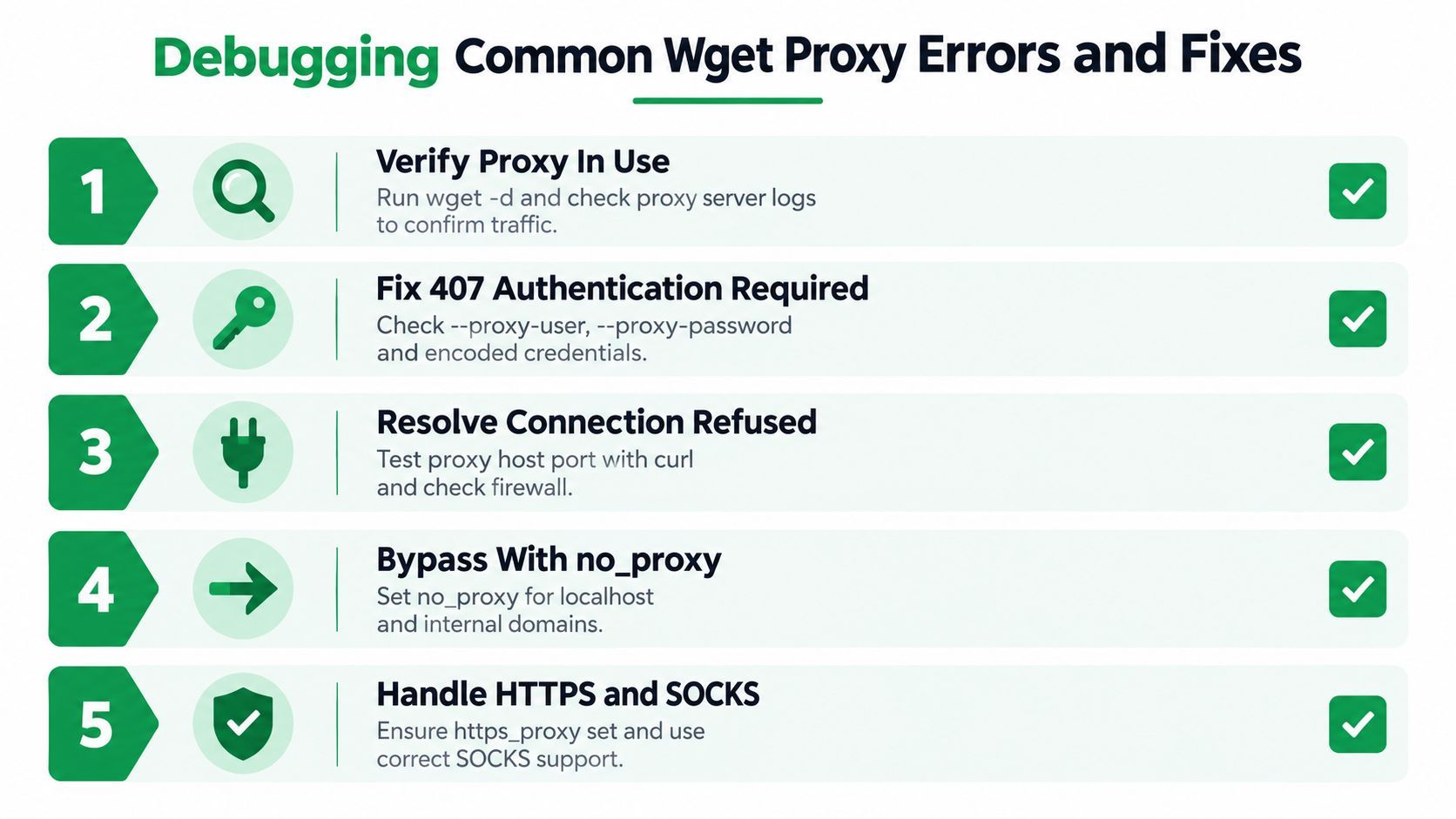
Start with debug output
Run Wget with debug logging:
wget -d
Look for connection details, proxy-related messages, and the destination Wget attempts to contact. Debug output can reveal that the request went directly to the target, that a bypass matched, or that a configured proxy URL was malformed.
Server-side proxy logs provide stronger confirmation. If the gateway sees no request, the problem is local resolution, environment inheritance, configuration precedence, or connectivity to the proxy itself. If the gateway logs the request and returns an authentication response, stop investigating the destination firewall and focus on credentials and authentication method.
Evidence beats repetition: Run the same URL once with an explicit proxy option and once with proxy use disabled, then compare the debug paths.
Match the symptom to the layer
A 407 Proxy Authentication Required response points to the proxy, not the origin server. Check --proxy-user, --proxy-password, shell quoting, and whether special characters in credentials are being interpreted by the shell or URL parser. If the gateway uses NTLM or a custom scheme, plain Wget options may never complete the challenge.
A connection refusal usually means Wget reached the network layer but couldn't establish a session with the proxy endpoint. Verify the host and port supplied by the network team, then test reachability with an approved diagnostic tool. The guide to using curl with a proxy offers a useful comparison when you need to determine whether the failure belongs to Wget or the gateway.
If only certain hosts bypass the proxy, inspect no_proxy. The list may come from the environment or a Wget startup file, and it can contain a hostname pattern that matches more broadly than intended. Remove the suspect entry temporarily, rerun with debug output, and then restore a narrower rule if the direct route was the cause.
Cron and container checks
For cron, print or log the environment available to the job, then invoke Wget from the same wrapper. Don't assume .profile, .bashrc, or a desktop proxy setting applies. For containers, inspect environment variables inside the running container and check whether a user home directory contains .wgetrc.
A practical isolation checklist looks like this:
- Confirm the binary: Check the Wget version and configured startup-file paths.
- Inspect inputs: Review
http_proxy,https_proxy,ftp_proxy, andno_proxy. - Find overrides: Search the command, wrapper script, and
.wgetrcforuse_proxy,proxy, and--no-proxy. - Trace the route: Run
wget -dand compare it with proxy logs. - Test authentication: Add credentials only after unauthenticated transport works.
This process prevents a common mistake: treating every failure as an origin-server problem when the request never left the local environment through the intended gateway.
Secure Habits and When to Use a Proxy Abstracting Service
Proxy configuration is part of your security boundary. Credentials in a command can enter shell history or appear to other local users through process inspection. Credentials in ~/.wgetrc are easier to reuse, but the file still needs restrictive permissions and should never be copied into a public repository or a broadly readable container layer.
Use a least-privilege proxy account where the gateway supports it. Separate credentials for CI, cron, and interactive administration make revocation more contained. Keep routing policy in environment injection or managed configuration, and keep secrets in the secret-management system provided by your deployment platform.
Rotation also needs a clear reason. Rotating routes can complicate debugging, invalidate allowlists, and create uneven behavior across retries. If a job needs stable access to a permitted resource, start with one known route and add rotation only when the network and application requirements justify it.
Know when Wget is the wrong abstraction
Wget is a strong fit for straightforward HTTP, HTTPS, and FTP retrievals, especially when you need shell automation, recursive retrieval, or a predictable command-line process. It becomes a poor fit when the target service actively changes its access controls, expects browser state, requires specialized authentication, or returns media through a workflow that keeps changing.
Large media and YouTube downloads can trigger bot detection, 403 responses, throttling, or extractor breakage. In that situation, adding more proxy flags may only move the failure from one layer to another. A proxy can change the network path, but it doesn't automatically provide cookies, browser behavior, extractor maintenance, or application-level handling for unavailable content.
A proxy-abstracting service can be a better boundary for teams building media ingestion. The proxy browser explanation helps distinguish network routing from browser and session abstraction. The key decision is whether your team wants to maintain those moving parts or consume a service that handles them behind an asynchronous job interface.
Before shipping a Wget-based job, verify the route, authentication scheme, bypass list, and runtime environment. Then decide whether the download is simple enough for Wget or complex enough to justify an API designed around media retrieval.
YouTube Download API handles proxy and extractor complexity behind an asynchronous workflow, returning direct CDN download URLs and metadata for supported media jobs. If your pipeline is spending more time on bot detection, cookies, proxy rotation, and broken extractors than on product work, visit YouTube Download API and evaluate it as a cleaner alternative to extending Wget.