Curl Use Proxy: A Practical Guide for 2026
Learn how to make curl use proxy servers for HTTP, HTTPS, and SOCKS traffic. Covers authentication, environment variables, tunneling, and troubleshooting.
Dalvo · September 10, 2026
You're debugging an API request from a CI runner, laptop, or production shell, and the target won't answer. The firewall may block outbound traffic, the endpoint may only accept requests from a particular region, or the environment may already require a corporate forward proxy. Before you reach for a VPN, SSH tunnel, or sidecar, try curl with a proxy. Curl has supported proxying since its early networking history, and its capabilities have grown from basic HTTP forwarding into support for HTTP, HTTPS, SOCKS4, and SOCKS5 proxy paths over nearly three decades (curl project history).
Table of Contents
- Why You Might Need Curl to Use a Proxy
- Environment Variables and .curlrc
- HTTPS Targets and CONNECT Tunneling
- Authenticated Proxies Without the 407 Loop
- SOCKS4, SOCKS5, and the DNS Question
- Troubleshooting the Most Common Proxy Errors
- When the Proxy Layer Stops Making Sense
Why You Might Need Curl to Use a Proxy
A proxy changes the network path between curl and the destination. That makes it useful when the machine running the command can't reach the target directly, when traffic must leave through a controlled gateway, or when you need to reproduce the path used by another environment.
Common triggers include:
- Restricted outbound access: A corporate firewall or hosted CI runner may permit traffic only through an approved forward proxy.
- Regional egress: A regional gateway can make a request originate from the network location expected by the target.
- Customer reproduction: Routing a local request through a customer-like proxy helps reproduce filtering, authentication, and DNS behavior.
- Debugging network identity: A proxy can separate origin-server behavior from the direct network identity of your workstation or runner.
- Internal reachability: Some services are reachable only from the network behind the proxy.
Curl's proxy control is intentionally compact. Use -x or its long form, --proxy, followed by a proxy URL in the form [scheme://]host[:port]. The scheme identifies the proxy protocol, not the destination protocol. An HTTPS URL can travel through an HTTP proxy, while an HTTP URL can travel through a SOCKS proxy.
curl -x http://internal.corp:8080
curl --proxy http://internal.corp:8080 https://api.example.com/v1/health
curl --proxy socks5://proxy.example:1080 https://api.example.com/v1/health
curl --proxy socks5h://proxy.example:1080 https://api.example.com/v1/health
For SOCKS proxies, curl defaults an unspecified proxy port to 1080. Plain HTTP proxy URLs commonly use 3128 when that port is configured by the proxy, but scripts should state the port explicitly rather than depend on an environment-specific default. Curl's documentation covers -x and --proxy, proxy URL schemes, and the broader libcurl configuration model (proxy option documentation).
Practical rule: Put the proxy scheme and port in every production command. Ambiguous defaults make shell scripts harder to audit.
Credentials can appear in a proxy URL:
curl --proxy https://api.example.com
That syntax is convenient for a quick local test, but credentials embedded in a command can appear in process listings, shell history, logs, and CI diagnostics. Prefer --proxy-user for repeatable commands, with the secret injected through a protected mechanism.
| Flag | Purpose | Example |
|---|---|---|
-x or --proxy | Selects the proxy and its protocol | `curl -x |
--proxytunnel | Requests an HTTP CONNECT tunnel | `curl -x --proxytunnel |
-U or --proxy-user | Supplies proxy credentials | `curl -x -U user:password |
--noproxy | Bypasses the proxy for selected targets | `curl --noproxy "*" |
Use --noproxy "*" when inherited proxy settings are breaking a request that must go directly. That escape hatch is particularly useful in containers and CI, where environment variables may be injected outside the script you're reading.
Environment Variables and .curlrc
Curl can receive proxy configuration from the command line, the environment, or a configuration file. The command line is the most explicit layer, so --proxy is the right choice when a single request must override inherited behavior.
The environment-variable pattern uses scheme-specific variables such as http_proxy and https_proxy, plus all_proxy for broader coverage and no_proxy for exclusions. Uppercase spellings are also commonly present, although lowercase variables are especially important for proxy configuration on Unix-like systems.
export http_proxy="http://proxy.example:3128"
export https_proxy="http://proxy.example:3128"
export NO_PROXY="localhost,127.0.0.1,.internal,10.0.0.0/8"
curl https://api.example.com
The exclusion list can contain an exact hostname, a leading-dot domain pattern for subdomains, or an IP and CIDR range. Keep exclusions narrow. A broad NO_PROXY entry can unexpectedly send sensitive traffic directly.
For stable personal defaults, curl can read ~/.curlrc. A repository or job can use --config with a separate file, which keeps settings out of command history:
proxy =
The configuration file is still a file on disk, so it isn't a safe place for long-lived plaintext credentials. In production, use --proxy-user with a protected credential source, such as a netrc file whose permissions and lifecycle are managed by the deployment system.
When a request behaves strangely, inspect all three layers. A command-line flag can override an environment setting, while a .curlrc entry can affect commands that look direct. Run with -v and check the effective connection path before changing the destination request.
HTTPS Targets and CONNECT Tunneling
An HTTPS request through an HTTP proxy has two distinct stages. Curl first connects to the proxy and asks it to open a TCP connection to the destination with an HTTP CONNECT request. After the proxy confirms the tunnel, curl performs the TLS handshake with the destination inside that connection.
curl --proxy http://proxy.local:8080 https://api.example.com/v1/health
For a plain HTTP target, the proxy can receive and forward the HTTP request itself. For an HTTPS target, the proxy generally sees the CONNECT destination and tunnel setup, while the TLS-encrypted request travels through the established connection. That distinction matters for both troubleshooting and security review.
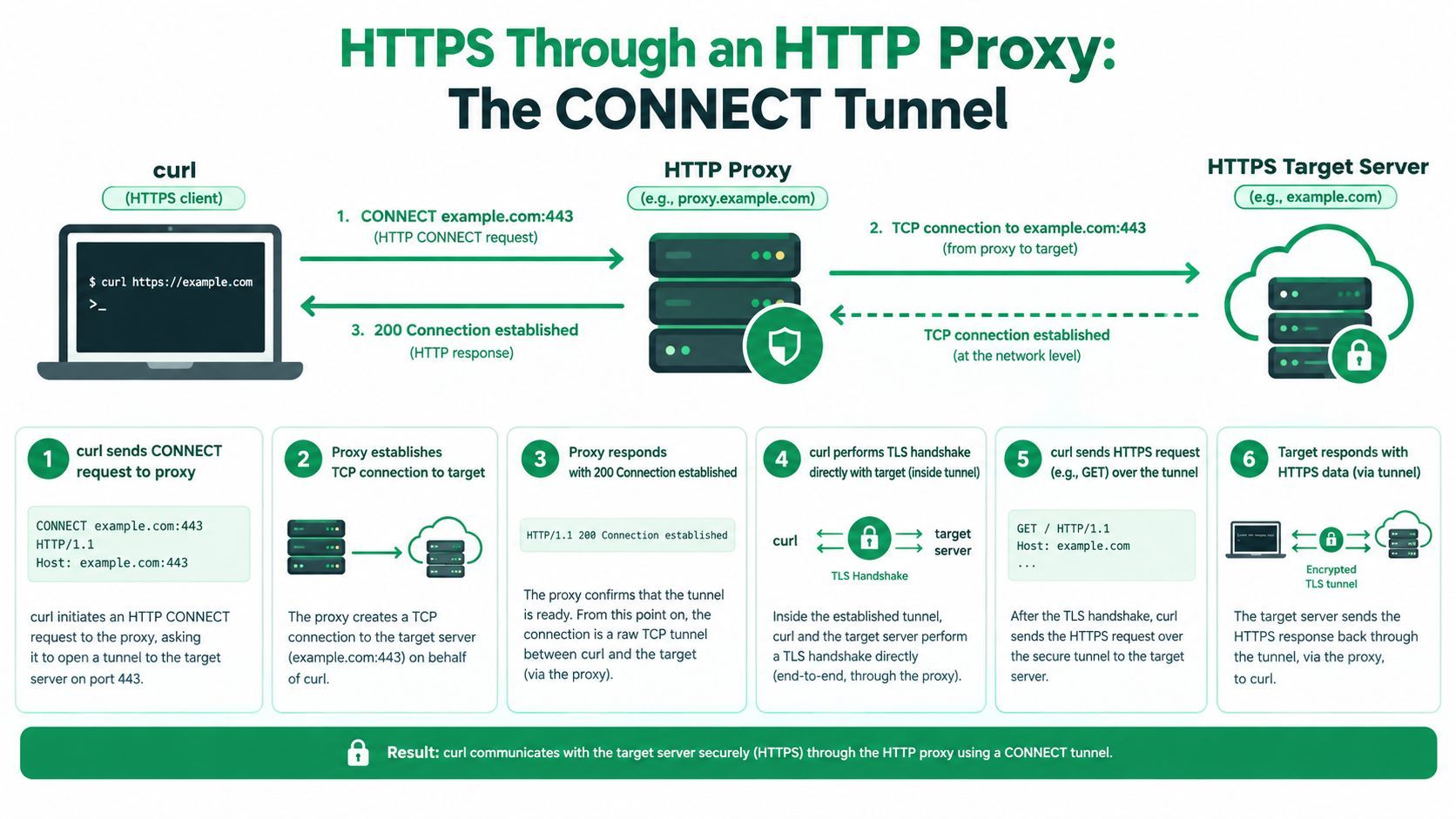
Curl's --proxytunnel option makes the intended behavior explicit:
curl --proxy http://proxy.local:8080 --proxytunnel https://api.example.com
For HTTPS destinations, CONNECT is the important operation, not a cosmetic flag. If a corporate proxy blocks CONNECT, requires a policy exception, or expects a different transport path, the failure occurs before the origin server can respond. Verbose mode separates those stages by showing whether curl reached the proxy, received a proxy response, established the tunnel, and then completed TLS.
Your origin Authorization header is protected by the TLS session once the tunnel is established. The proxy can still authenticate its own hop separately, and an inspection proxy may terminate and re-establish TLS under its own policy, so the local trust store must contain the required enterprise CA when that design is in use. Don't treat --insecure as the routine fix. It removes destination certificate verification rather than correcting the proxy trust chain.
Authenticated Proxies Without the 407 Loop
A 407 Proxy Authentication Required response means the proxy rejected its own hop. It does not indicate that the API rejected your Bearer token. Keep the two credential paths separate, then start with explicit proxy credentials:
curl --proxy http://proxy.example:8080 \
  --proxy-user "user:password" \
  https://api.example.com
A proxy may require Basic, Digest, NTLM, or Negotiate. Correct credentials still fail when curl selects the wrong method. --proxy-anyauth lets curl discover a supported scheme, though discovery can add another negotiation step on the first connection, as described in the curl proxy authentication guide.
curl -v --proxy http://proxy.example:8080 \
  --proxy-user "user:password" \
  --proxy-anyauth https://api.example.com
Read the proxy's Proxy-Authenticate response in verbose output. It shows which methods the proxy offers. If the same command produces repeated 407 responses, stop retrying it unchanged. The request is reaching the proxy, but authentication negotiation is not completing.
| Flag | Auth scheme | When to use |
|---|---|---|
--proxy-basic | Basic | The proxy permits Basic and the connection policy protects the credentials |
--proxy-digest | Digest | The proxy advertises Digest |
--proxy-negotiate | Negotiate, commonly SPNEGO or Kerberos | An enterprise proxy requires integrated authentication |
--proxy-ntlm | NTLM | A legacy proxy specifically requires NTLM |
--proxy-anyauth | Negotiated method | Curl must discover a supported proxy scheme |
Proxy headers and origin headers are different exchanges. Use adding custom headers with curl when the destination API needs request headers, but do not place proxy credentials in an origin Authorization header. For header-level debugging, inspect the proxy challenge separately from the response returned by the API.
SOCKS4, SOCKS5, and the DNS Question
SOCKS operates as a general relay rather than an HTTP-aware forwarder. That makes it a better fit when the client needs to carry different TCP protocols through the same gateway, but the hostname-resolution mode becomes a critical choice.
These commands look almost identical:
curl --proxy socks5://proxy.example:1080 https://internal.host
curl --proxy socks5h://proxy.example:1080 https://internal.host
With socks5://, curl resolves the destination hostname locally and then asks the SOCKS proxy to connect to the resulting address. With socks5h://, curl sends the hostname to the proxy and lets the proxy perform the lookup. The h means hostname resolution through the proxy.
That difference can expose a split-DNS design. Suppose internal.host exists only in the network behind the SOCKS service. Local resolution may fail before the proxy receives a useful request. Even when local resolution succeeds, it can reveal the queried hostname to the local resolver and select an address that isn't valid from the proxy's network.
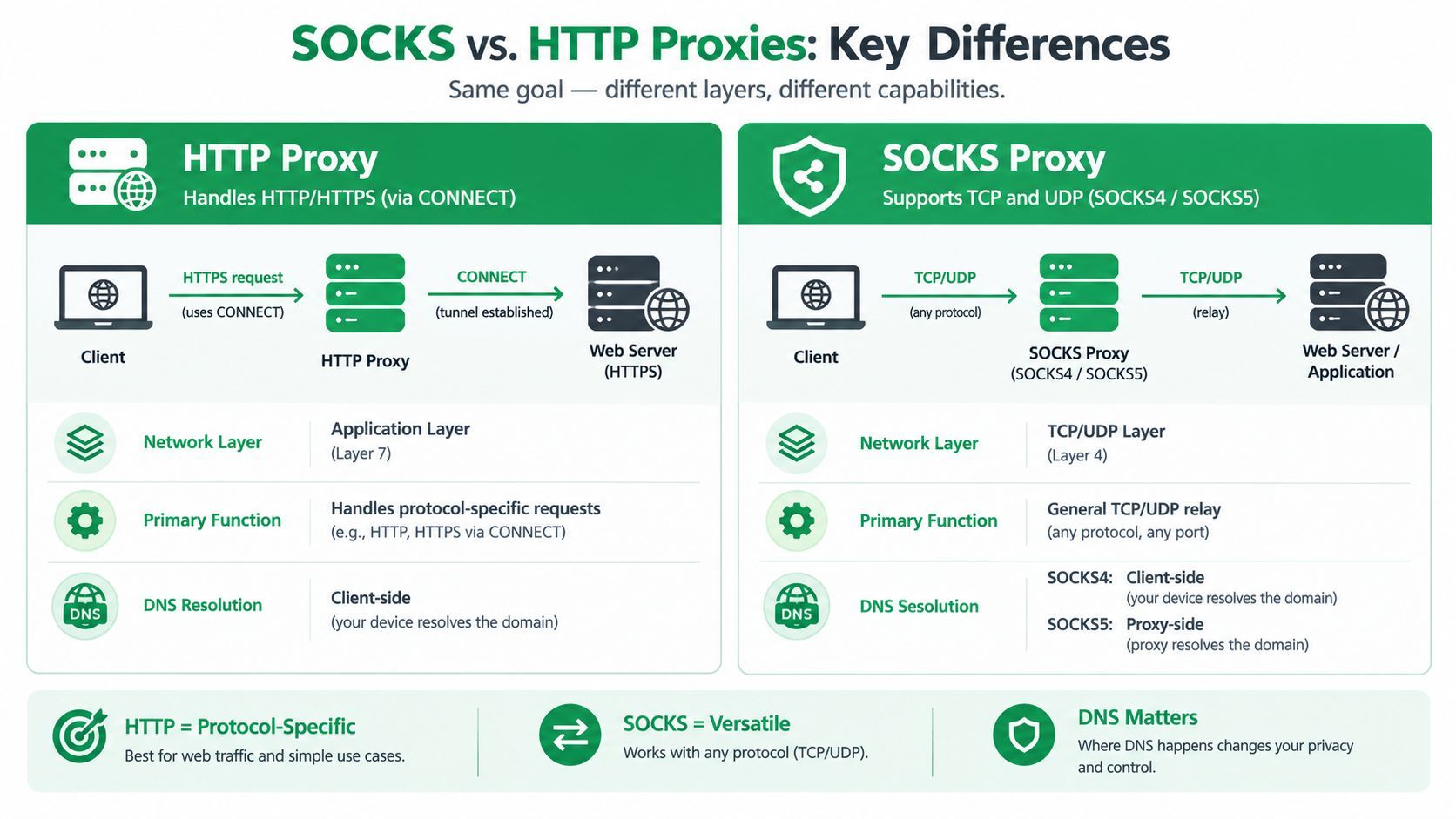
DNS rule: Use
socks5h://when the destination exists on the proxy side or when local DNS visibility is undesirable. Usesocks5://only when local resolution is intentional.
SOCKS4 is a legacy option with narrower capabilities. socks4a:// exists for cases that need hostname handling through the proxy, while socks5:// and socks5h:// are usually clearer choices for current deployments. Curl's proxy documentation describes this local-versus-remote DNS distinction and the related NO_PROXY behavior (curl proxy transport guidance).
Troubleshooting the Most Common Proxy Errors
Proxy debugging gets faster when you identify the failing hop before changing flags. Run the smallest reproducible request with -v:
curl -v --proxy
A connection refusal means curl couldn't establish the proxy connection. A 407 means the proxy answered but rejected authentication. A TLS certificate error after CONNECT points to the TLS leg, not necessarily to proxy credentials.
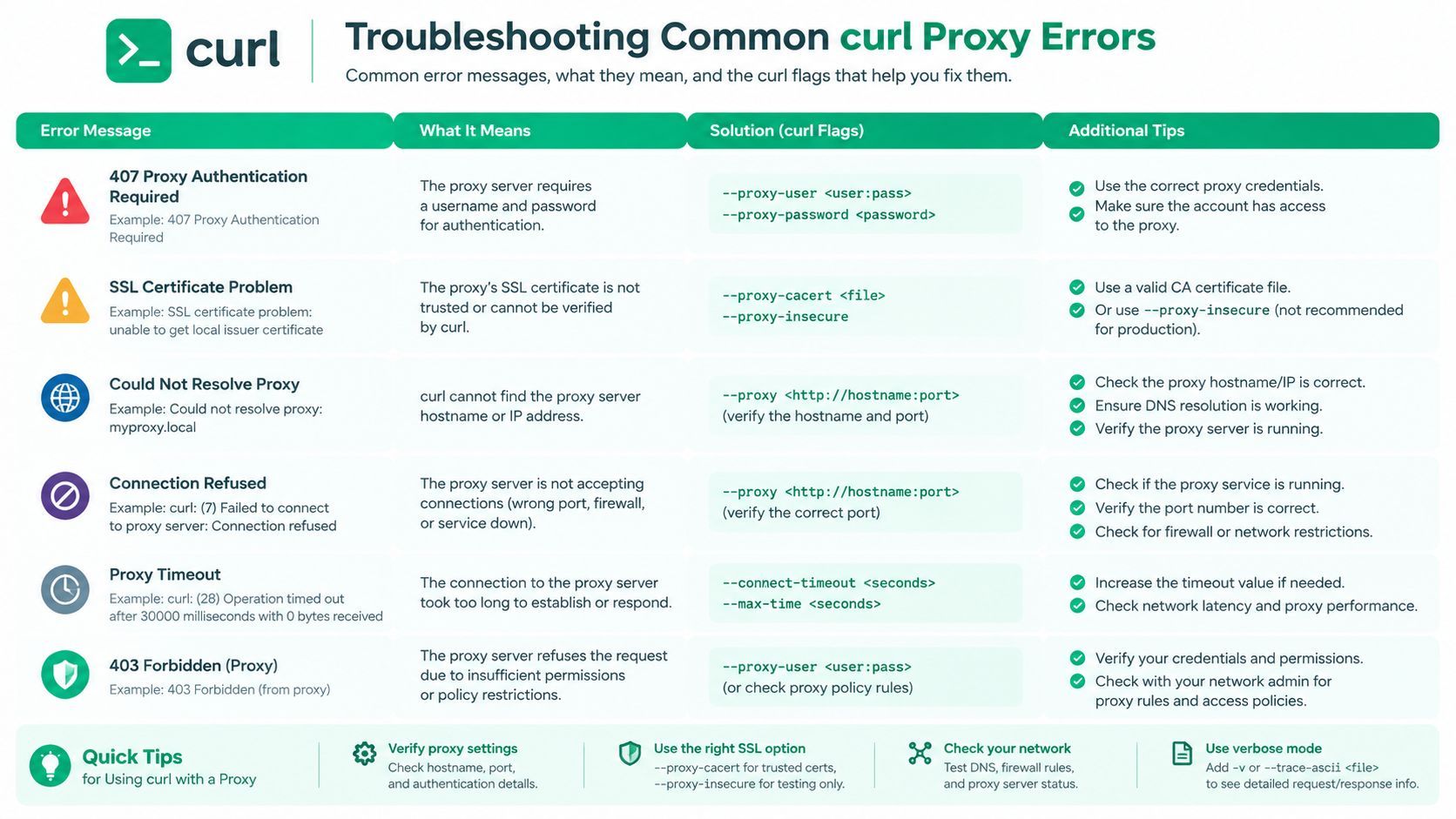
Use the error to choose the next test:
- 407 Proxy Authentication Required: Add
--proxy-user, then try--proxy-anyauthif the scheme isn't known. ReadProxy-Authenticatein verbose output rather than assuming the password is wrong. - 407 after CONNECT: The proxy may require authentication specifically during tunnel setup. Check whether it expects Digest, Negotiate, or NTLM, and confirm that
--proxytunnelmatches the proxy's policy. - Could not resolve proxy: Check the proxy hostname as seen by the current runtime. A name that resolves on your laptop may not resolve inside a container or CI runner.
- Connection refused: Verify the configured proxy port and whether the gateway accepts connections from this network.
- SOCKS handshake failure: Confirm the scheme, hostname, port, and authentication requirements. Change
socks5://tosocks5h://when the destination must resolve remotely. - TLS or certificate failure: Determine whether the certificate belongs to the origin or an HTTPS proxy. Use the appropriate CA configuration, and reserve insecure bypasses for controlled diagnosis.
For a request-level view of returned headers, use this curl header inspection guide. Keep that investigation separate from -v, which exposes connection and negotiation details that ordinary response-header output may not show.
A practical first-line checklist is simple: confirm the proxy URL and port, run -v, test proxy authentication separately from origin authentication, verify CONNECT behavior for HTTPS, select socks5h:// when remote DNS is required, and remove inherited settings with --noproxy "*" when testing a direct path.
When the Proxy Layer Stops Making Sense
Curl plus a single known proxy is a sensible tool for an ad-hoc diagnostic, an internal integration, or a low-volume job. The design changes once the proxy itself becomes a product you have to operate.
A larger extraction workflow may require rotating residential proxies, storing and refreshing credentials, selecting regions, retrying failed sessions, handling CAPTCHA challenges, and maintaining TLS behavior across changing targets. Each concern adds state and failure modes that have little to do with the business data your application is trying to collect.
The operational burden often appears gradually:
- Credential lifecycle: Secrets need storage, rotation, access control, and revocation.
- Routing decisions: The worker must select an egress path and recover when that path degrades.
- Retry discipline: Repeating a blocked request can waste time and intensify detection.
- Session consistency: Cookies, headers, TLS sessions, and IP selection may need to remain aligned.
- Observability: Logs must distinguish origin errors from proxy errors without exposing credentials.
That is the point where a proxy-management layer may be more appropriate than a longer curl command. A managed API can expose one authenticated endpoint while handling routing, retries, extraction updates, and structured responses behind it. The trade-off is usage-based cost and another vendor relationship, but the engineering team no longer maintains every proxy failure directly.
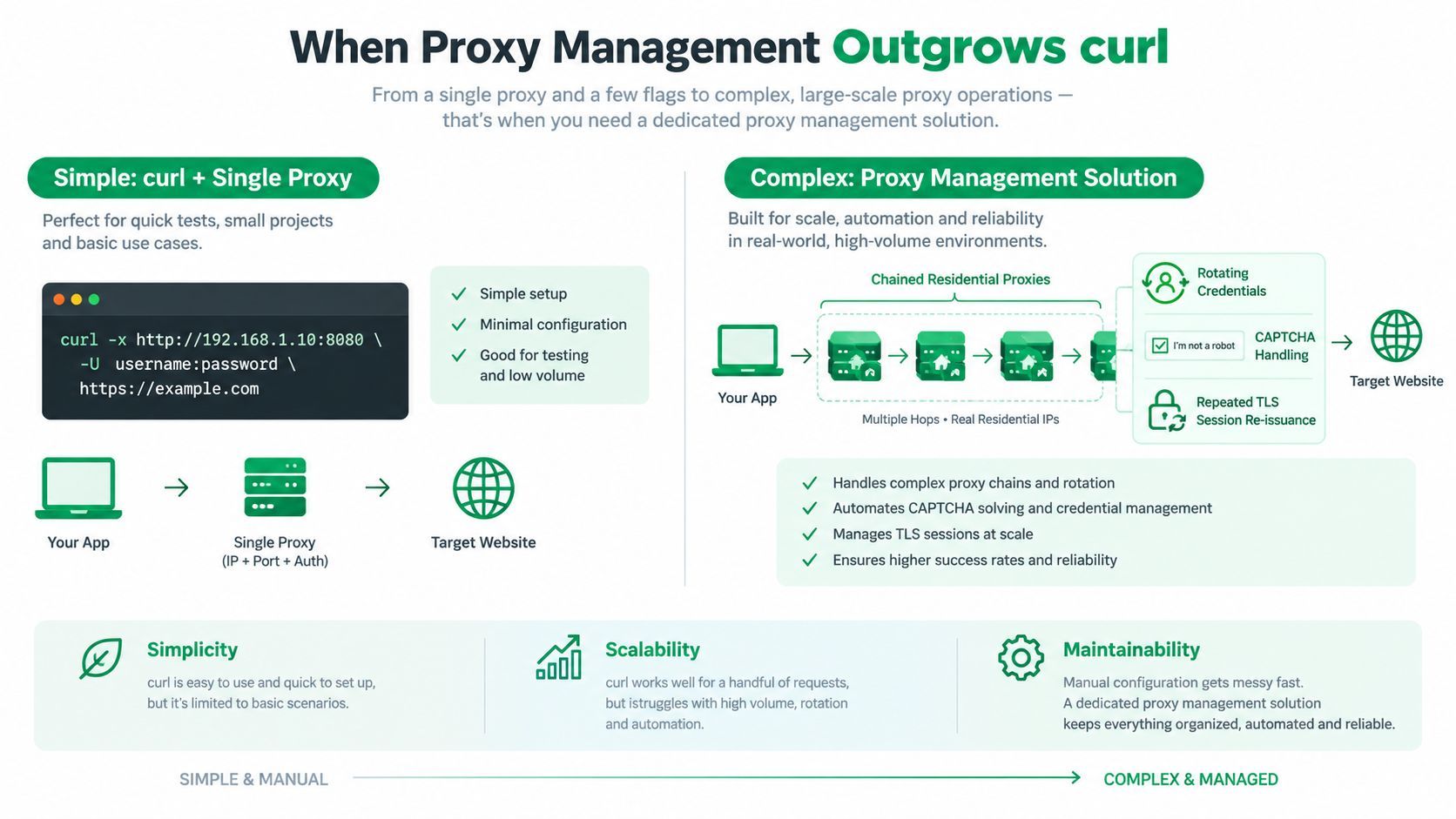
The practical decision rule is clear. Keep curl and a proxy for controlled traffic where you understand the gateway and target. Consider a managed service when geography, volume, anti-bot defenses, or session handling turns proxy plumbing into a permanent subsystem. If you're evaluating the maintenance cost of rotating infrastructure, compare it with rotating proxies and unlimited bandwidth before committing to a design.
If your workflow is retrieving YouTube media rather than debugging a single proxied request, YouTube Download API provides an API-key-based REST workflow that handles downloads asynchronously and returns direct CDN URLs and metadata. Visit the service to evaluate whether moving proxy, cookie, bot-detection, and extractor maintenance behind an API fits your ingestion pipeline.