Curl Show Header: How to Display and Debug HTTP Headers
Learn how to use curl show header commands like -I, -i, -v, and -D to inspect request and response headers, debug REST APIs, and handle redirects effectively.
Dalvo · August 27, 2026
Your API call returns a successful status, but the client still fails. The body is empty, the JSON parser rejects the response, or a redirect sends the request somewhere unexpected. In these sessions, the missing clue is often in the HTTP response headers, not the payload.
The fastest way to make that invisible information visible is usually a carefully chosen curl flag. The right combination can show response headers beside the body, isolate them in a file, expose the headers your client sent, or reveal a redirect that your first command followed. The wrong combination can also mislead you, especially when an endpoint treats HEAD differently from GET, or when a script mixes diagnostic output with machine-readable JSON.
Table of Contents
- Why Headers Matter When Debugging APIs
- Core Curl Flags for Displaying Headers
- Saving and Isolating Headers Cleanly
- Handling Redirects and HTTP/2 Edge Cases
- Choosing the Right Flag for Your Debugging Goal
- Common Mistakes and How to Avoid Them
Why Headers Matter When Debugging APIs
A status code alone rarely tells the whole story. A response can look healthy at a glance while its headers reveal a cache decision, a missing content type, a cookie change, or a redirect to another endpoint. Headers can also expose server information, cookies, dates, and the HTTP version, which is why the official curl man page treats response-header inspection as a core command-line capability.
During an API incident, start by asking what the server returned. A Content-Type header can explain why a downstream JSON decoder refuses the body. A Location header can show that the request landed somewhere else. Cache-related headers can distinguish an origin response from a response served by an intermediary. Authentication and throttling behavior often becomes clearer when you inspect the complete response instead of only reading the body.
A practical debugging sequence looks like this:
- Quick response check: Use
curl -I URLwhen the endpoint handlesHEADcorrectly and you only need headers. - GET with headers included: Use
curl -i URLwhen the response body matters and you want both streams together. - Request and response visibility: Use
curl -v URLwhen you need to confirm what curl sent as well as what the server returned. - Clean separation: Use
curl -D headers.txt URLwhen a script must process the body independently.
Practical rule: If an API behaves differently from what the status code suggests, inspect headers before diving into application logs.
This approach is particularly useful when an upstream service reports a resource or quota problem. The response body may be generic, while headers can expose routing, caching, or retry information that helps identify whether the failure originated at the application, gateway, or edge. A related example of diagnosing resource failures appears in this guide to handling a resource limit error.
The important distinction is simple. -I asks for a header-only HEAD response, while -i, -v, and -D are generally used with a request that retrieves the resource itself. That method difference is where many otherwise sensible debugging commands go wrong.
Core Curl Flags for Displaying Headers
Start with the least noisy command:
`curl -I
-I, also written as --head, sends a HEAD request and prints only the response headers. It doesn't download the response body. The output has the familiar HTTP shape:
HTTP/1.1 200 OK
Content-Type: application/json
Content-Length: ...
The exact values depend on the endpoint and response, so treat this as a structure example rather than a fixed transcript. -I is excellent for a quick availability or metadata check, but it can mislead you when the API handles HEAD differently from GET. Some application routes reject HEAD, omit body-dependent headers, or generate a different response path.
For a normal retrieval with headers placed before the body, use:
`curl -i
-i, or --show-headers, prints HTTP response headers in the same output stream as the response body. The official documentation describes this as a way to show headers such as the server name, cookies, date, and HTTP version alongside returned data. It doesn't show the request headers you sent, and combining headers with JSON makes the output unsuitable for direct parsing unless you separate the streams later.
Verbose mode is broader:
`curl -v
The output marks request headers with > and response headers with <. It also includes connection and TLS diagnostics, which makes it the better choice when you need to answer, “What did my client send?” rather than only, “What did the server return?” Verbose diagnostics are written to standard error, while the response body normally goes to standard output. That behavior is useful for interactive debugging but often surprises people who pipe the command into another tool.
Finally, dump response headers separately:
`curl -D /tmp/headers.txt
The body remains available on standard output, while response headers go into /tmp/headers.txt. The curl documentation identifies --dump-header as the alternative when you want to save headers separately. To discard the body while still making a normal request, add -o /dev/null:
`curl -s -D /tmp/headers.txt -o /dev/null
| Flag | HTTP method used | Shows request headers | Shows response headers | Body in output | Best for |
|---|---|---|---|---|---|
-I or --head | HEAD | No | Yes | No | Fast header-only checks |
-i or --show-headers | Usually GET | No | Yes | Yes | Interactive response inspection |
-v or --verbose | Request-dependent | Yes | Yes | Usually yes | Full protocol debugging |
-D file or --dump-header file | Request-dependent | No | Yes, in a file | Yes, on stdout | Scripting and clean parsing |
The flag you choose should match the question. Use -I to ask what a HEAD response looks like. Use -i to see the returned document with its headers. Use -v to inspect the exchange. Use -D when the body must remain usable by jq, a test harness, or another process.
Saving and Isolating Headers Cleanly
For automation, don't make a combined -i stream carry two unrelated data formats. A JSON body followed by or preceded by HTTP headers isn't valid JSON, so a command such as this is fragile:
curl -si https://httpbin.org/get | jq .
jq receives header lines as well as the payload. It may fail immediately, or a later change in the response can make a previously accidental parsing setup break. Save the headers separately instead:
curl -sS -D /tmp/headers.txt https://httpbin.org/get | jq .
Now jq sees only the body. The header file remains available for inspection, assertions, or extraction. This pattern is especially useful when moving the same workflow into Python or another application, as shown in this practical guide to using curl from Python.
You can inspect the saved file with ordinary text tools:
grep -i '^content-type:' /tmp/headers.txt
To retrieve a redirect target:
grep -i '^location:' /tmp/headers.txt
To examine cookies:
grep -i '^set-cookie:' /tmp/headers.txt
Header field names aren't case-sensitive at the HTTP level, so case-insensitive filtering with grep -i is safer than assuming one capitalization. Be cautious with cookies because a Set-Cookie field can contain semicolons and attributes that make simplistic field splitting unreliable.
If you only need headers from a GET response, keep the body out of the terminal:
`curl -sS -D /tmp/headers.txt -o /dev/null
This differs from -I. The command still performs the normal request method, but it discards the payload after receiving it. That distinction matters for endpoints whose response headers depend on the method or request processing.
For a temporary split without creating a file, use:
`curl -sS -D - -o /dev/null
Here, -D - writes response headers to standard output and -o /dev/null discards the body. If you need both streams in a script, use separate files or process substitution rather than trying to parse a mixed stream.
A compact status-aware pattern can preserve the body and headers independently:
headers=$(mktemp) && body=$(mktemp) && code=$(curl -sS -D "$headers" -o "$body" -w '%{http_code}' https://httpbin.org/get) && if [ "$code" = "200" ]; then jq . "$body"; else cat "$headers" >&2; cat "$body" >&2; fi; rm -f "$headers" "$body"
That structure makes the decision from the status code, keeps headers available for diagnostics, and only sends the body to jq when the response is acceptable.
Handling Redirects and HTTP/2 Edge Cases
Redirects are where a simple curl show header command often tells an incomplete story. Without -L, curl stops at the initial redirect response. With -L, it follows the Location target, but a basic header display may leave you focused on the final response and overlooking the intermediate hop that caused the problem.
Start by inspecting the first response without following it:
`curl -sS -D /tmp/first-headers.txt -o /dev/null
Then follow the redirect while preserving header output:
`curl -sS -L -D /tmp/all-headers.txt -o /dev/null
A header dump can contain multiple response blocks when redirects occur. Read each status line and Location field in order. If you need the request and response exchange, use:
`curl -v -L
Remember that -I -L follows redirects using HEAD, not GET:
`curl -I -L
That can produce a chain different from the one your application sees. If the server redirects only after processing a GET, or rejects HEAD, use -i -L, or use -D with the body discarded:
`curl -sS -L -D /tmp/headers.txt -o /dev/null
HTTP/2 adds another layer. Verbose output can expose protocol-specific details, including pseudo-headers such as :status and :authority. Tools written around HTTP/1.1 formatting may not handle those lines as expected, even though curl is reporting the exchange correctly.
Force HTTP/1.1 when a parser or debugging workflow behaves more predictably with the older wire representation:
`curl --http1.1 -v
This doesn't repair a server-side issue, but it helps isolate whether the confusing output is related to protocol negotiation or to the application response. A HEAD request can also fail against an HTTP/2 endpoint when the server's method handling is incomplete. If curl -I returns an error, repeat the check with a normal GET and discard the body.
| Edge case | Symptom | Fix |
|---|---|---|
| Redirect not followed | You see only the initial redirect headers | Add -L, then inspect all dumped response blocks |
| Redirect followed too quietly | You focus only on the final response | Use -v -L or -D with a saved file |
HEAD differs from GET | -I returns an error or different headers | Use -i, or use -D with -o /dev/null |
| HTTP/2 output confuses a parser | Pseudo-headers don't match expected HTTP/1.1 lines | Retry with --http1.1 |
| Header history is unclear | A single file contains several response blocks | Read status and Location lines sequentially |
Choosing the Right Flag for Your Debugging Goal
Start with the question your request must answer. Use -I for a quick HEAD check when the endpoint handles that method correctly. To verify the response from the application path, send a normal request and save its headers with -D. If you need to add or inspect request headers, the curl add header guide covers the relevant syntax.
For interactive work, -i keeps headers and the body together in the terminal. That helps during a quick check, but complicates body parsing. Use -v when the suspected fault involves sent headers, TLS, a proxy, or protocol negotiation. Its diagnostics are noisy and go partly to standard error, so it is better suited to terminal inspection or a deliberate debug log.
| Debugging goal | Recommended flag | Output includes | Redirect-safe | Script-friendly |
|---|---|---|---|---|
Check a HEAD response quickly | -I | Response headers only | Add -L when appropriate | Conditional |
| Inspect a normal response interactively | -i | Headers and body together | Add -L | Limited |
| See sent and received headers | -v | Request, response, and connection diagnostics | Use -L -v | Noisy |
| Parse a body while retaining headers | -D file | Body on stdout, headers in a file | Use -L -D file and review blocks | Yes |
| Get headers without keeping the body | -D file -o /dev/null | Headers only, from the chosen request | Works with -L | Yes |
| Force a simpler protocol view | --http1.1 with another flag | HTTP/1.1-oriented exchange | Combine as needed | Useful for compatibility |
Authentication checks need the same separation between the request and its output. Send the credential explicitly, then capture headers and the body independently:
curl -sS -H 'X-API-Key: your-key' -D /tmp/headers.txt -o /tmp/body.json
Do not place real secrets in shared shell history or public tickets. For an authenticated media-ingestion workflow with asynchronous job responses, YouTube Download API documents request-based integration patterns that can be tested with these header-inspection techniques.
Common Mistakes and How to Avoid Them
Most curl header failures come from using a command that answers a different question than the one you intended.
Mistake one, using -I on a POST route.
curl -I sends HEAD, not POST. A route designed only for creation may reject it with 405 Method Not Allowed. To inspect the POST response, send the method and payload, then dump headers separately:
`curl -sS -X POST -H 'Content-Type: application/json' -d '{"name":"test"}' -D /tmp/headers.txt -o /tmp/body.json
Mistake two, piping verbose output into a body parser.
curl -v https://example.com/api | jq . sends the body to standard output, but verbose diagnostics go to standard error. jq won't receive the verbose headers, which can create the false impression that curl failed to show them. Use -D for headers you need to process, and reserve -v for a terminal or an explicitly combined diagnostic log.
Mistake three, trusting a header file without checking redirect history.
When redirects are enabled, a dump file can contain multiple response blocks. A script that grabs the first matching Location or cookie may read an intermediate response instead of the final one. Save the file per request, inspect status boundaries, and make your redirect policy explicit.
Mistake four, parsing mixed -i output as if it were one format.
HTTP headers and a response body have different parsing rules. Line-based processing can also become unreliable when the body uses transfer-encoding details or contains text that resembles a header. Use -D to separate the streams before applying grep, awk, sed, or jq.
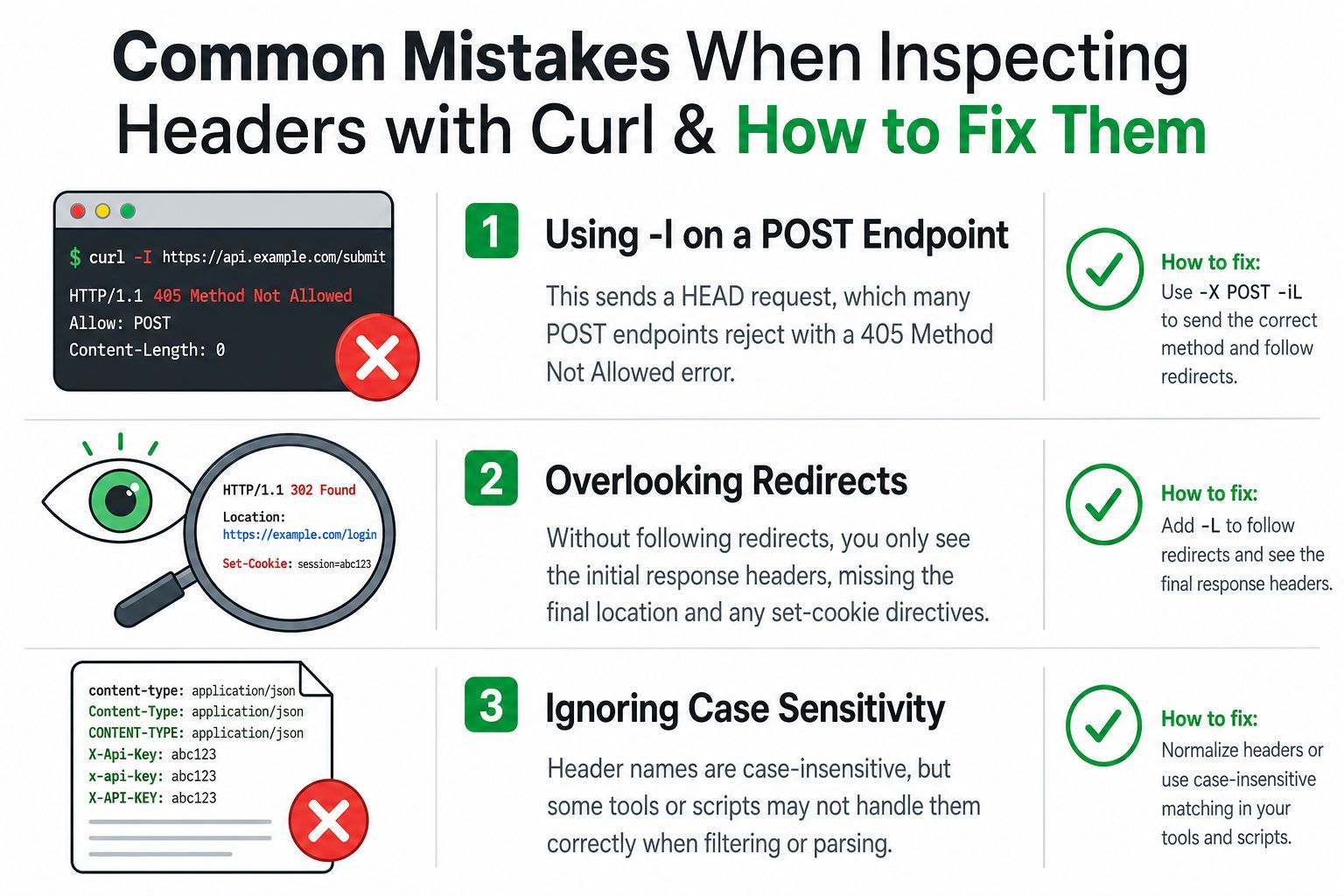
Before running a check in CI or against production, confirm the request method, decide whether redirects should be followed, keep headers separate from the body, and remember that verbose output uses standard error. Also check whether your parser handles repeated headers and case-insensitive field names.
Use these curl header patterns to verify authenticated requests, redirect behavior, and clean response parsing in your own integrations. If your product needs a REST workflow for retrieving YouTube media while handling job status, metadata, and direct download URLs, visit YouTube Download API and test the documented request flow with the same disciplined header checks.