Resource Limit Is Reached: A Fix Guide for API Quotas
Facing API quota errors? Learn how to diagnose and fix resource limit is reached errors fast, plus tips to prevent them in 2026.
Dalvo · August 6, 2026
Your batch import was moving along fine, then the dashboard lit up with a resource limit is reached error and every request started failing. The odd part is that nothing looked “down” in the usual sense, the site was still up, other traffic might even have been flowing, but the job in front of you stalled hard. That's the kind of failure that wastes time because the message is broad, while the cause is usually narrow.
Table of Contents
- Why Your API Suddenly Says Resource Limit Is Reached
- The Three Classes of Resource Limit Failures
- A Practical Debugging Workflow for Resource Errors
- Building Resilient Retry Logic and Backoff Strategies
- Quota Management and Monitoring That Prevents Surprises
- Product-Level Mitigations and Graceful User Experiences
Why Your API Suddenly Says Resource Limit Is Reached
A SaaS team pushing a YouTube ingestion pipeline usually notices the failure at the worst time, mid-run, after the queue has already built up. The first instinct is to blame the traffic spike, but the error isn't about raw visitor count in the way people expect. In CloudLinux-based shared hosting, 508 Resource Limit Reached is typically tied to the entry process (EP) ceiling, which measures how many PHP requests are being processed at the same time, not how many people visited across the day AHosting's cPanel resource limit guide.
That distinction matters because a short burst can trip the ceiling even when overall volume looks modest. A site can appear healthy, then hit the wall when several requests arrive together and each request stays open long enough to stack behind the others. Hosting references also note that the account-level throttle can affect one overloaded site while the rest of the server stays available, which is why this error often looks local rather than global AHosting's cPanel resource limit guide.
Why the message feels misleading
The phrase resource limit is reached hides too much. It can mean a hosting account hit its process ceiling, a cloud service exhausted quota, or an infrastructure layer couldn't satisfy demand right then. Google Cloud separates quota errors from resource availability errors, and those are not fixed the same way, because one is about allowance while the other is about scarcity Google Cloud quota troubleshooting.
That's why treating every case like a rate-limit problem backfires. Rate limits ask you to slow request frequency. Capacity limits often need caching, lighter requests, fewer background jobs, or a higher allocation. In practice, the operational clue is often simple, if the error appears during a short spike, but the average load looks fine, you're probably dealing with concurrency pressure or transient scarcity, not a true daily-volume cap CloudLinux and cPanel resource limit guidance.
Practical rule: if the job fails in bursts and recovers when retried later, don't start by rewriting client throttling. First figure out whether the system is rejecting work because it ran out of allowance or because a shared resource was briefly unavailable.
The Three Classes of Resource Limit Failures
Most troubleshooting threads collapse everything into one bucket, then recommend one generic fix. That wastes hours. A better model splits the problem into capacity and quota exhaustion, per-process or per-account hosting limits, and transient infrastructure scarcity, because each class points to a different remedy.
Capacity and quota exhaustion
This is the cleanest failure mode to reason about. A system hits a documented allowance, then stops accepting more work until usage drops or the limit changes. Google Cloud's documentation explicitly distinguishes quota problems from resource availability problems and recommends checking quota metrics, requesting increases, or using a different configuration when the system has run out of allowance Google Cloud quota troubleshooting.
For API teams, this usually shows up as a predictable ceiling. The failed request isn't “bad,” it's beyond what the account or project can consume at that moment. That means retries alone won't help unless the usage window naturally moves or the quota changes.
Per-process and per-account hosting limits
CloudLinux-based shared hosting adds another layer. The account is isolated, and if it reaches a limit, the provider can throttle that account without taking the full server down AHosting's cPanel resource limit guide. That's operationally useful because one noisy workload doesn't poison the whole machine, but it also means the failure is often local to a single site or application.
Several hosting guides note that administrators should inspect cPanel's Resource Usage view, especially the last 24 hours or 7-day graphs, because the spike usually lines up with one of the capped resources dchost.com on cPanel resource graphs. If the graph shows a sharp plateau, you're not chasing mystery behavior. You're looking at a deterministic throttle.
Transient infrastructure scarcity
The last class is the one generic guides skip. Sometimes the system isn't out of quota, it's just temporarily unable to satisfy the request. Google Cloud calls out resource availability errors separately, with fixes that can include retrying later, changing region or zone, or selecting another machine configuration Google Cloud quota troubleshooting. That's a very different decision tree from a quota increase request.
Useful separation: if the fix is “try again later,” you're dealing with transient scarcity. If the fix is “inspect exact metrics and maybe request more allowance,” it's quota exhaustion. If the fix is “optimize the site or move plans,” it's a hosting ceiling.
A Practical Debugging Workflow for Resource Errors
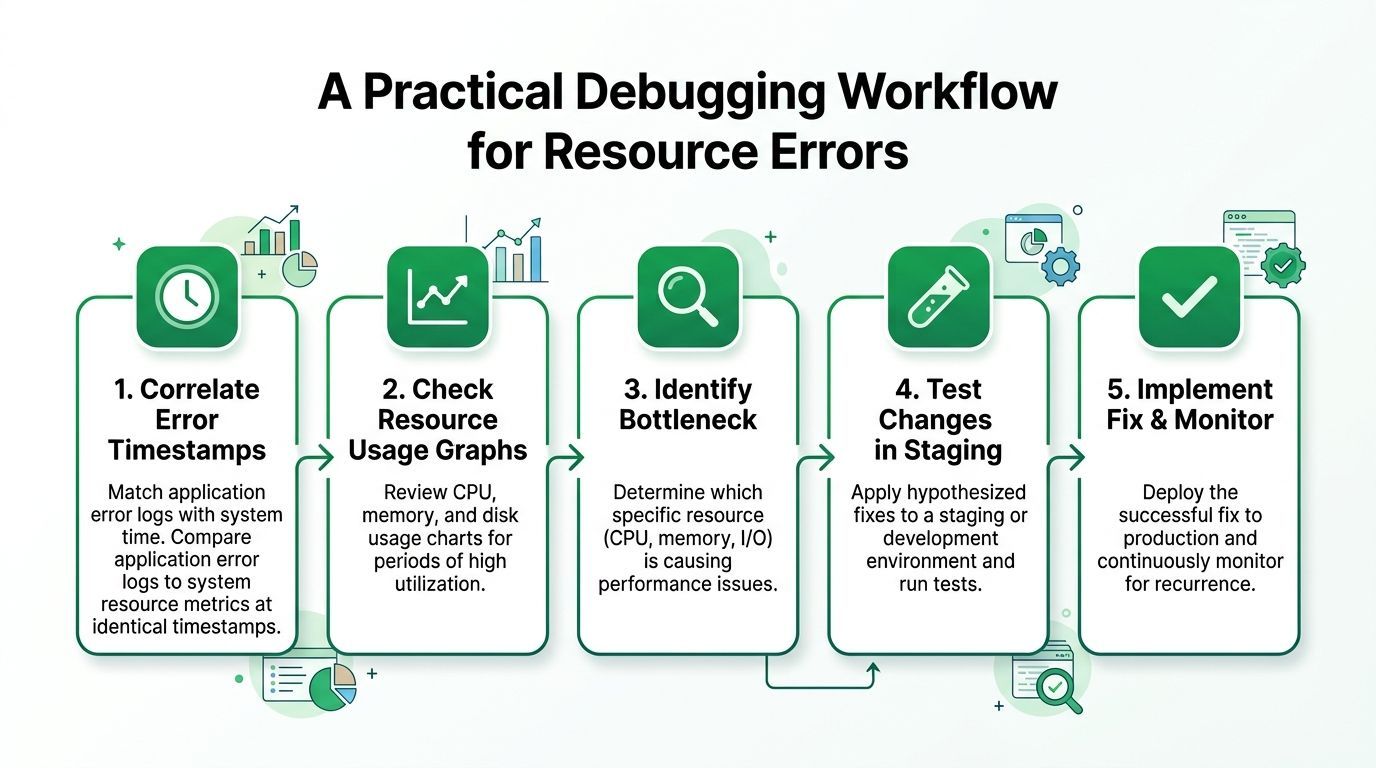
When production is already failing, theory doesn't help much. The fastest route is to line up the failure time with the system's own usage history, then change one thing at a time so you know what moved the needle. cPanel and CloudLinux guidance both point engineers toward the Resource Usage graphs, with CPU, physical memory, Entry Processes, and I/O or IOPS reviewed across the last hour, day, and week dchost.com on cPanel resource graphs.
Correlate the failure window
Start with the exact timestamp of the failed request. Then compare that moment to the cPanel graph or the provider's usage panel and check whether CPU, memory, EP, or I/O hit a hard edge. The value of this step is that it cuts through guesses. A spike that aligns with the failure is evidence, not noise.
The same advice applies outside cPanel. If you're debugging an API or a hosted worker, look for the metric that saturated at the exact failure window, then correlate that with logs. That's the difference between knowing “something broke” and knowing which budget got spent.
Change one variable, then retest
The usual remediation order is practical, not glamorous. Hosting guidance repeatedly favors caching first, then removing or replacing heavy plugins, then optimizing images and database queries, and finally blocking abusive bots dchost.com on fixing resource limit errors. The reason caching tends to win is simple, it reduces the amount of work each request needs to do, which lowers the chance of hitting both concurrency and CPU ceilings.
A clean workflow looks like this:
- Check the exact cap first: don't touch three things at once, or you won't know which resource was the actual bottleneck.
- Retest after each change: verify that the failure window no longer lines up with the same plateau.
- Use staging when the fix is risky: if you're changing plugins, job scheduling, or request fan-out, test away from live users.
- Watch the graph again afterward: a short-term improvement isn't enough if the ceiling comes back during the next spike.
For a concrete integration pattern, the engineering handoff often looks cleaner when teams keep request generation, status polling, and file delivery separate, like the flow described in this API integration example. That separation makes it easier to see which step is burning resources.
Building Resilient Retry Logic and Backoff Strategies
Automatic retries help only when the failure is transient. If you keep hammering an exhausted quota or a saturated account, you just create more pressure and more noise. The first coding rule is to classify the error before retrying it, because a transient scarcity event and a permanent allowance problem shouldn't share the same handler.
Retry the right failures, not every failure
A good retry loop is selective. It retries because the system might recover, not because repetition is magic. That means your code should treat “resource temporarily unavailable” differently from “quota exhausted” or “account limit reached,” and your business logic should surface the latter to a human when the plan or architecture needs intervention.
A simple pattern:
- Transient errors: retry with exponential backoff and jitter.
- Quota exhaustion: stop retrying quickly, alert the user, and log the exhausted bucket.
- Ambiguous errors: inspect the provider's error taxonomy before deciding.
The reason jitter matters is practical, multiple clients failing together can otherwise retry in lockstep and stampede the same bottleneck again. Queue-based retries are safer for bulk jobs because they let you slow fan-out and preserve ordering where it matters.
“Retrying a quota error five more times doesn't create capacity. It just creates five more failed attempts and makes the incident harder to read.”
Keep requests idempotent
Retries are only safe if the operation can survive a second attempt. For upload, import, and job-submission flows, idempotency keys or request deduplication prevent double work when the first response got lost. That matters especially for asynchronous pipelines where the submission succeeded but the polling or completion callback got interrupted.
A resilient queue usually needs three things working together:
- A backoff policy for short-lived scarcity.
- A job state machine that distinguishes submitted, running, failed, and exhausted.
- A human escalation path for cases where the limit is structural, not temporary.
If you're handling media ingestion or download workflows, a machine-readable error taxonomy pays off. You don't want the UI guessing whether to “try again” or “upgrade,” you want the backend to tell it.
Quota Management and Monitoring That Prevents Surprises
Reactive fixes keep the incident short. Monitoring keeps the same incident from happening twice. Mature teams don't just watch current usage, they watch remaining quota, consumption velocity, and how fast the system is moving toward exhaustion so they can act before users notice.
Monitor the right signals
A quota dashboard should be boring in the best way. It needs to show what's left, what's being consumed, and which workload is eating it. Alerts that fire only when the limit is already gone are late alerts. Alerts that fire too early become background noise, so the useful pattern is a stepped warning model, with attention at intermediate levels and escalation near the ceiling.
Credit-based metering helps because it ties usage to a resource model teams can reason about. If your product consumes credits, requests, or job tokens, track the burn rate in the same place you track the remaining balance. That's the cleanest way to avoid discovering exhaustion from customer complaints.
For a dashboard style that keeps reliability visible rather than hidden, see the operational monitoring approach described on VidKraken reliability.
Decide when to ask for more headroom
Not every ceiling is a problem to optimize away. Some workloads outgrow the plan, period. If you've already reduced waste and the usage curve still presses against the ceiling during normal business operation, the right move is usually to request a higher allowance or move to an environment with more predictable resources.
The key is to separate temporary spikes from structural growth. If the same pattern repeats after caching, query cleanup, and workload smoothing, the business has outgrown the old limit. At that point, the risk isn't just failure, it's repeated surprise.
Product-Level Mitigations and Graceful User Experiences
Even well-tuned systems hit limits sometimes. The product decision isn't whether that can happen, it's how ugly the experience should be when it does. A cryptic error code sends users to support. A clear fallback keeps the workflow moving, even if the full result can't be produced right away.
Design the failure path on purpose
Bulk jobs should not behave like single-shot synchronous calls if they create burst pressure. Queue them, spread them out, and give users a visible status model so they know the work hasn't vanished. Partial results are often better than a hard stop, especially when the system can process some of the work immediately and defer the rest.
That also changes the support burden. When the UI tells users that processing is delayed because the account hit a limit, support tickets become smaller and more specific. When it just says “failed,” every issue becomes a mystery.
Make the upgrade or retry path helpful
A good fallback doesn't shame the user. It explains whether the delay came from a transient spike or a hard ceiling, then offers the next logical action. If the job can be retried safely, say so. If it can't, tell the user what's blocked and what needs to change on the backend or the plan.
Architecturally, the investment is usually worth it when synchronous processing is the thing causing your limit pressure. Moving expensive work to asynchronous jobs, prioritizing smaller tasks ahead of heavier ones, and caching repeated reads all reduce the number of times users collide with the ceiling. For teams working around bandwidth-heavy or repeated fetch patterns, the trade-offs are similar to those discussed in rotating proxies and bandwidth handling, except the goal here is protecting your own capacity instead of evading a remote one.
If your team is building YouTube import or sync features, YouTube Download API gives you an asynchronous, production-ready way to retrieve video and audio without carrying the bot-detection and extractor maintenance yourself. It fits this exact problem space because it separates submission, polling, and delivery, which makes resource handling and retry logic much easier to control. Visit YouTube Download API if you want a media ingestion path that's built for real production limits, not just happy-path demos.