What Is Parsing Data and How Engineers Actually Use It
Learn what is parsing data, how structured and unstructured inputs become usable fields, and where parsing fits in real engineering pipelines.
Dalvo · August 24, 2026
You've just received a large API response. The request succeeded, the payload is valid JSON, and yet none of it is ready for your database. Metadata sits inside nested objects, a manifest is buried in an array, timestamps use a different format from the one your application expects, and one missing field could break the entire import.
That's the practical setting for what is parsing data. Parsing is the process of turning raw bytes or text into structured, typed fields that software can validate, store, and use. A parser doesn't decide what your business means. It identifies the pieces, gives them structure, and creates a reliable boundary between an incoming format and the rest of your system.
Table of Contents
- What Is Parsing Data and Why Every Pipeline Starts There
- The Three Shapes of Data You Will Actually Parse
- Core Parsing Techniques and the Libraries Behind Them
- Parsing API Responses in Practice
- Streaming Parsing Versus Batch Parsing
- Validation and Error Handling That Prevents Silent Corruption
- Putting Parsing Inside a Real Ingestion Workflow
What Is Parsing Data and Why Every Pipeline Starts There
A useful mental model is to treat parsing as translation. An API sends characters and bytes according to its own rules. Your application needs fields such as videoId, title, durationSeconds, or thumbnailUrl. The parser reads the incoming representation, recognizes its structure, and maps it into values your program can work with.
IBM describes parsing as separating data and assigning its parts to variables, including splitting text into smaller pieces or formatting data into columns in its documentation on parsing data. In modern ingestion systems, that same operation converts unstructured or semi-structured input into structures such as JSON objects, CSV rows, records, or typed application models.
The mental model
A raw response usually passes through several conceptual stages:
- Read the input. The client receives bytes from an HTTP response, file, queue, or device.
- Recognize tokens. The parser identifies delimiters, keys, values, strings, numbers, arrays, and objects.
- Build structure. Those tokens become a tree, stream of records, or sequence of events.
- Assign types. Text may become a number, Boolean, timestamp, or enumerated value.
- Expose fields. Downstream validation, transformation, storage, and analytics can finally operate on predictable data.
Parsing became foundational as compiler theory matured through the 1960s and 1970s. Donald Knuth's LR parsing work appeared in 1965, Jay Earley's parsing algorithm in 1968, and the first widely used LALR parser generator underlying yacc came into use around 1973. Lex and Yacc were formalized in 1975, helping automated parsing become a standard part of software tooling, as described in this historical overview of parser generation algorithms.
Practical rule: If a downstream component needs a field, some parser must first establish where that field is and what it represents.
That's why parsing sits at the front of an ingestion pipeline. Schema mapping can't map a field that hasn't been identified. Validation can't check a value that remains embedded in an opaque string. Analytics can't aggregate a duration until the system knows whether it represents text, seconds, milliseconds, or something else.
The important warning is that a parser can produce a clean-looking object while still interpreting the input incorrectly. Good engineers learn to inspect the boundaries, types, missing fields, and skipped content before trusting the result.
The Three Shapes of Data You Will Actually Parse
The easiest way to choose a parsing strategy is to classify the incoming data by shape, not by the library you happen to use. Most payloads fall into structured, semi-structured, or unstructured categories.
Structured data
Structured data follows a defined arrangement. A CSV file has rows and delimiters. A JSON API commonly exposes named keys. Parquet and Avro carry stronger structural expectations through their data models and schemas.
A structured example might look like this:
{
  "videoId": "abc123",
  "durationSeconds": 502,
  "isLive": false
}
A JSON parser can walk the object and return fields directly. A CSV parser can split records while respecting quoted delimiters. The first failure engineers usually meet is not that the format is unknown. It's a type or schema mismatch, such as a duration arriving as a string when the consumer expects a number.
Semi-structured data
Semi-structured data has recognizable fields, but records may vary. NoSQL documents, JSON Lines, and media manifests often fit here. One record might include a thumbnailUrl, while another supplies an array of thumbnail objects. A manifest may contain several variants with different resolutions and optional attributes.
Semi-structured input benefits from a parser that understands the outer grammar while allowing optional fields. The common failure is schema drift. Producers add, remove, rename, or nest fields, and naive code assumes every record has the same shape.
Unstructured data
Unstructured data includes free-text logs, transcripts, OCR output, and HTML. The content may contain useful meaning, but the format doesn't expose every value as a reliable field. Engineers often need decoding, tokenization, pattern recognition, and domain-specific rules before they can build a stable record.
Encoding errors are an early danger. A parser may correctly split text while still misreading characters, punctuation, or currency symbols because the input encoding differs from the assumed encoding.
| Shape | Example Formats | Typical Parser | Common Failure Mode |
|---|---|---|---|
| Structured | JSON, CSV, Parquet, Avro | Format-aware decoder | Type or schema mismatch |
| Semi-structured | NoSQL documents, JSON Lines, media manifests | Flexible document or record parser | Schema drift and optional fields |
| Unstructured | Logs, transcripts, OCR output, HTML | Tokenizer, pattern parser, or document parser | Encoding and ambiguous meaning |
The classification isn't permanent. An HTML response may contain a structured JSON script block, and a JSON field may contain free text. Classify each layer separately, then choose a parser for that layer rather than forcing one tool to interpret the entire payload.
Core Parsing Techniques and the Libraries Behind Them
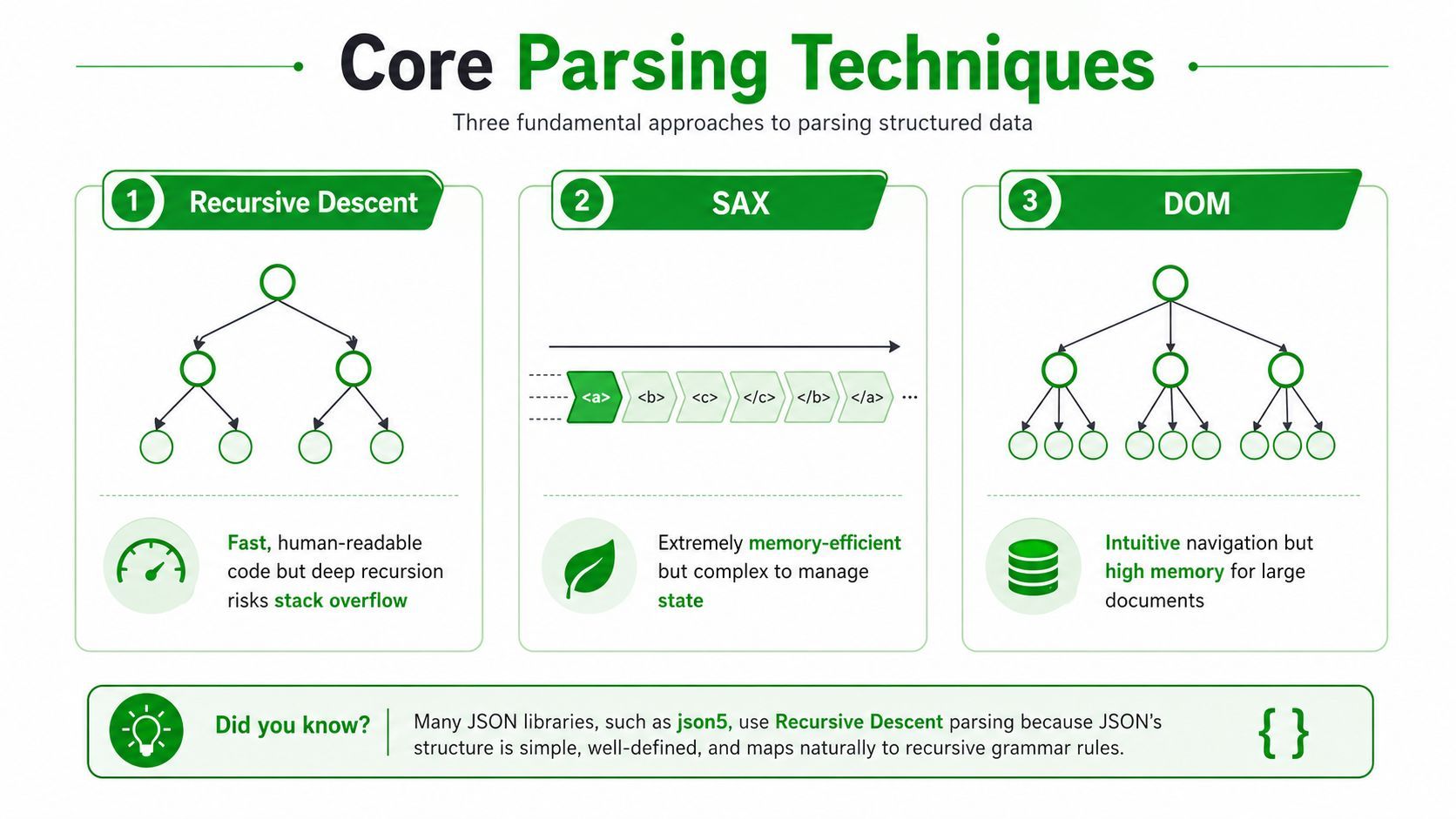
Parsing techniques differ mainly in how much input they retain, how explicitly they represent grammar, and how much control they give you over errors. The right choice depends on payload size, nesting, contract strength, and whether records need to appear before the complete input arrives.
Recursive descent
Recursive descent follows the grammar through nested function calls. JSON libraries such as Jackson and jsoncpp use this general family of ideas to turn braces, brackets, strings, and scalar values into objects and arrays.
It's a strong default for small or moderate, predictable payloads. The code is often readable, and errors can point near the unexpected token. The cost appears with nested input or a design that materializes the whole document, because memory use rises with the object tree and recursion can create stack pressure.
Event-driven parsing
SAX-style parsers read a stream and emit events such as “start element,” “text,” or “end element.” An XML reader can process a large document without retaining the entire tree. Similar event or iterator patterns work for streaming JSON.
This approach keeps memory pressure low and starts producing output early. You pay for that efficiency with state management. Your handler must remember enough context to know which field an event belongs to, and debugging can be harder when a malformed record appears after many successful events.
DOM parsing
DOM parsing builds a complete in-memory representation of the document. It's intuitive because application code can move from a root node to children, siblings, and attributes without managing parser events.
That convenience makes DOM useful when you need to inspect the same document repeatedly or access fields in unpredictable order. It's a poor fit for large documents when available memory is constrained, because the parser retains the full tree instead of releasing completed portions.
Schema-first parsing
Avro and Protobuf start from a contract. The schema defines fields and types, and generated code handles serialization and deserialization. This can catch incompatibilities early and gives teams a clearer agreement between producers and consumers.
The trade-off is operational and architectural. Both sides need compatible schema handling, and generated representations can add serialization or versioning work. Schema-first tools make the most sense when contracts matter more than casual flexibility.
A practical shortcut:
- Choose recursive descent or DOM-style decoding for small, predictable payloads.
- Choose event-driven parsing when input is large or naturally streamed.
- Choose schema-first parsing when producer and consumer need a strong contract.
- Choose regex and tokenizers for log lines or custom formats only when no dependable grammar exists.
Regex is useful for a line such as status=ok duration=502, but it becomes fragile when fields can contain escaped delimiters, nested structures, or quoted text. Once a format has a grammar, use a grammar-aware parser.
Parsing API Responses in Practice
API parsing becomes clearer when you follow the data through concrete response shapes. The parser's job isn't “call json.loads.” It must identify the relevant path, normalize types, preserve evidence, and handle optional or malformed content deliberately.
Video metadata
Suppose an endpoint returns a wrapper object:
{
  "data": {
    "media": {
      "video": {
        "id": "abc123",
        "title": "Example video",
        "durationSeconds": 502,
        "thumbnails": [
          { "url": "https://cdn.example/thumb-small.jpg" },
          { "url": "https://cdn.example/thumb-large.jpg" }
        ]
      }
    }
  }
}
A disciplined parser first tokenizes the JSON and builds its object structure. It then walks the path data.media.video, extracts id, title, and durationSeconds, and selects a thumbnail according to an explicit rule. That rule might prefer a large image, but it shouldn't assume the first array item is always the right one.
The parser should also verify that durationSeconds is numeric, distinguish a missing thumbnail from an empty URL, and retain the original response bytes when it ignores fields. Raw input helps engineers investigate changes without asking the upstream service to reproduce the response.
Media manifests
An HLS .m3u8 file is line-oriented text. A DASH .mpd file is an XML document. They describe media variants and segments, but the parsing approach differs.
For HLS, the parser reads tags and URI lines, associates attributes such as bandwidth and resolution with the following media URI, and emits variant objects. For DASH, an XML parser walks elements and attributes, then resolves representations and segment information into a comparable internal model.
Naive code often assumes every variant contains the same attributes or that a URI immediately follows the metadata it belongs to. A resilient implementation maintains parser state, treats optional attributes as optional, and stores the original manifest when a field is skipped or cannot be interpreted.
Clipped timestamps
A clipping request may provide an ISO 8601 duration such as PT1H23M45S, or an epoch value expressed in milliseconds. These aren't interchangeable strings. The parser must recognize the representation, validate its components, and convert it into one internal time unit before the clipping logic runs.
For example, PT1H23M45S represents a duration composed of hours, minutes, and seconds. An epoch-millisecond value represents a point on a time scale. A parser that treats both as plain integers can produce a technically valid value with the wrong meaning.
| Response Type | Example Input Shape | Key Fields Extracted | Common Failure Mode |
|---|---|---|---|
| Metadata JSON | Nested objects and arrays | ID, title, duration, thumbnails | Wrong path or assumed field |
| Media manifest | HLS lines or DASH XML | Bandwidth, resolution, segment URIs | Lost parser state or optional attributes |
| Timestamp input | ISO duration or epoch value | Normalized start and end times | Unit or semantic confusion |
For API integrations involving media metadata and formats, the API integration example provides useful context for thinking about response boundaries. The key practice remains the same: parse each layer according to its grammar, then normalize the result into a typed internal record.
Streaming Parsing Versus Batch Parsing
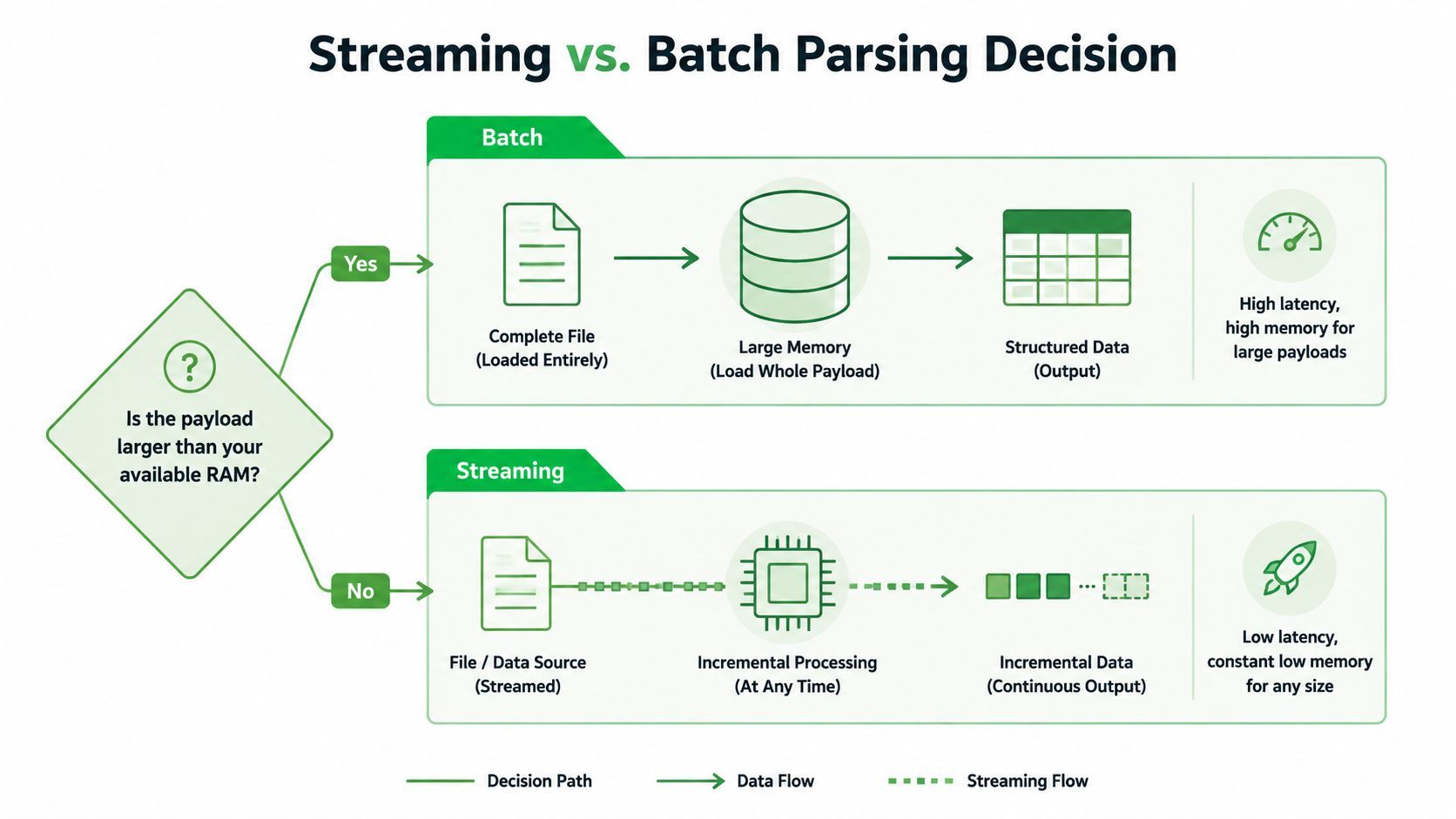
Batch parsing reads the complete response before building a usable structure. It's easy to reason about, easy to test with a fixture, and often the right choice when the payload is comfortably within available memory. A 50 MB JSON blob can fit comfortably in a batch workflow, provided the application has enough memory for both the input and the decoded object, as discussed in this overview of data parsing.
A 5 GB log file is a different problem. Loading the complete file, then creating strings, arrays, and objects for its contents, can create severe memory pressure. Streaming lets the parser read a portion, emit a record, and release data that downstream components no longer need.
What streaming changes
A SAX-style XML reader emits events as elements arrive. An ijson-style JSON iterator can yield matching records without materializing the whole document. A newline-delimited parser can process one JSON object per line and pass it immediately to validation.
Streaming improves the timing of the first usable record and reduces peak memory pressure. It also makes the parser responsible for partial input, state across chunks, and downstream flow control.
Streaming isn't automatically faster. It's a memory and latency decision.
Batch parsing can exploit locality and simpler control flow. Streaming code may process more carefully because it can't assume that a complete object, line, or tag has arrived in one read. It can also be harder to debug when an event arrives in an unexpected order or when an error occurs after earlier records have already been emitted.
Backpressure matters
A streaming parser can still overwhelm a slow database or queue. Backpressure provides the control mechanism: the downstream consumer signals that it can't accept more data, and the parser pauses or reduces production until capacity returns.
Use batch parsing when the payload is bounded, predictable, and easy to fit within the memory budget. Use streaming when the input is large, continuous, or valuable before completion. The choice should follow the relationship between payload size, available memory, first-record latency, and downstream capacity.
Validation and Error Handling That Prevents Silent Corruption
A parser can fail loudly, or it can produce the wrong value without raising an exception. The second outcome is more dangerous. Research on complex document parsing identifies problems with layout robustness, vision-language reliability, and inference efficiency, while independent discussion of the same documents highlights inconsistent outputs on identical inputs in recent parsing literature. Those concerns apply directly to tables, decimals, currencies, timestamps, and legal terms, where a structurally valid result can still change meaning.
Three failure categories
Hard errors are malformed tokens or impossible structures. An unterminated JSON string, invalid XML nesting, or broken delimiter should normally stop that record from entering the clean-data path.
Soft errors are recoverable transformations that deserve visibility. A numeric string may be convertible to a number, but the parser should log that coercion if the contract says the producer should send a number.
Silent corruption occurs when the value passes basic validation but means something different from what the consumer expects. A duration in seconds interpreted as milliseconds is syntactically valid and semantically wrong.
Validate at the boundary
Put validation immediately after parsing, before storage or business logic. JSON Schema works well for JSON payloads. Python teams may use Pydantic or dataclasses, while other languages can use generated types or equivalent typed decoders.
A useful boundary pattern looks like this:
- Decode explicitly. Identify the character encoding and reject unexpected input rather than guessing.
- Coerce deliberately. Use named functions such as
parse_duration_seconds()instead of relying on implicit conversion. - Check presence and meaning. A field can exist while containing an empty, out-of-range, or semantically incompatible value.
- Preserve evidence. Store raw bytes or a protected raw payload reference alongside the parsed result when auditability matters.
- Isolate bad records. Send failures to a dead-letter path with the error category and source context instead of terminating an entire batch.
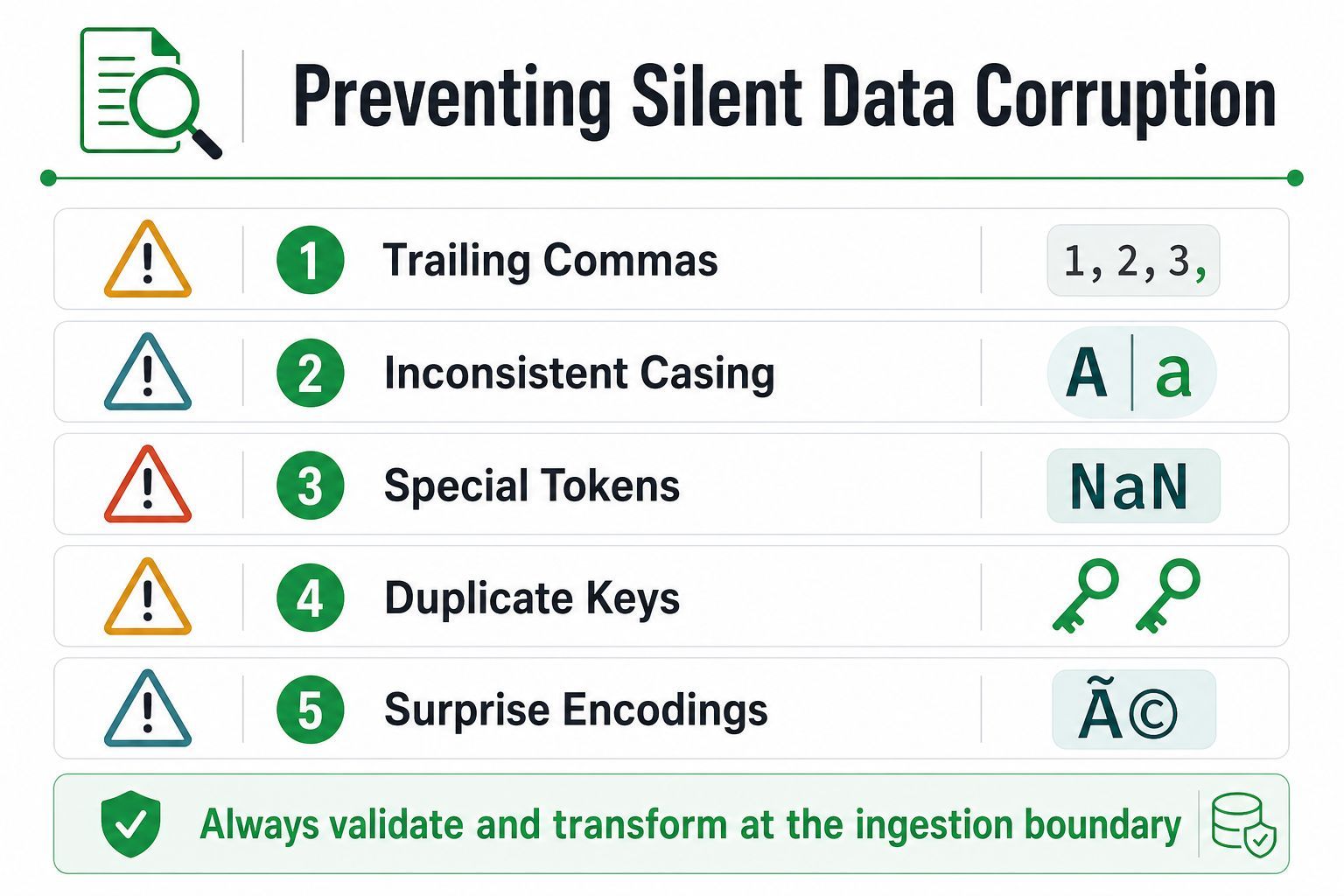
Trailing commas, inconsistent casing, special tokens such as NaN, duplicate keys, and surprise encodings deserve explicit tests. A lenient parser may accept some of them, but acceptance isn't the same as correctness.
Boundary discipline: Parse first, validate second, normalize third, and only then let downstream code use the record.
Resource limits can also look like parser failures. If an input exceeds the process's memory or time budget, review the guidance on handling a reached resource limit and consider bounded reads, streaming, and payload limits before adding retries.
Putting Parsing Inside a Real Ingestion Workflow
A YouTube Download API-style workflow makes the full mental model concrete. A client submits a media URL and receives an API response containing metadata, processing status, and eventually a direct media result. Your ingestion service still owns the job of turning each response into a validated internal record.
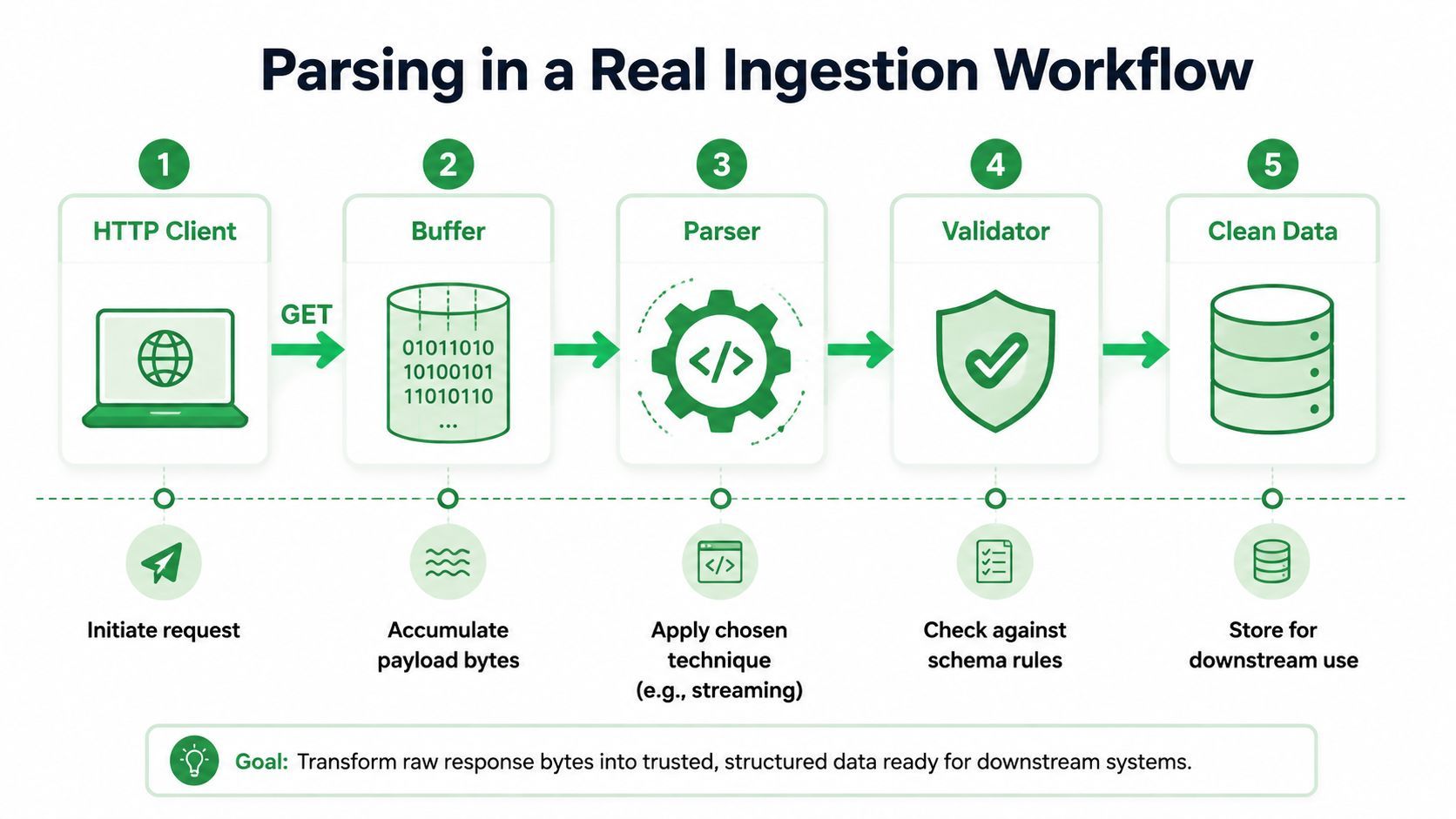
The five-stage path
- Request creation. An HTTP client sends a request and records the endpoint, request identifier, status code, and response headers.
- Byte acquisition. The client reads raw response bytes into a bounded buffer or passes them directly into a streaming parser.
- Structural parsing. A JSON parser materializes fields such as
videoId,title,duration,thumbnailUrl, and format manifests. - Validation. A schema checks required fields, types, timestamp semantics, supported formats, and machine-readable error states.
- Storage. The validated record is written to a database, queue, or object store for downstream consumers.
The format manifest deserves its own branch. Core metadata can use a strict schema because missing or mistyped identity fields should be visible immediately. A manifest parser may be more tolerant of optional variant attributes, provided it records skipped fields and preserves the original manifest for diagnosis.
Clip-window timestamps create another dependency. The parser must normalize start and end values before a consumer calculates the requested segment. If one component handles ISO durations and another expects epoch milliseconds, the validator should reject the mismatch at the boundary rather than allowing an incorrect clip to reach storage.
A production web scraping service may also need to preserve response headers, retry context, and source URLs as metadata around the parsed record. Those details don't replace parsing, but they give operators the evidence needed to understand why a record was incomplete or rejected.
The workflow can be summarized in one sentence: receive bytes, identify structure, build typed fields, validate meaning, preserve evidence, and store only records that downstream systems can trust.
If your team needs structured video, audio, thumbnail, duration, quality, and download information from YouTube URLs, YouTube Download API provides a REST workflow that returns machine-readable media results for ingestion. Use the parsing practices above at your boundary, validate the returned fields, and visit YouTube Download API to evaluate it for your application.