Web Scraping with Scrapy: A Production-Ready Guide
Master web scraping with Scrapy through this hands-on guide covering spider setup, selectors, pipelines, anti-bot tactics, and deployment best practices.
Dalvo · September 3, 2026
You start with requests and BeautifulSoup, extract a few fields, and feel finished. Then the target site returns a 403, pagination skips records, cookies expire, and one malformed product card breaks the entire run. The code still looks small, but the operational problem is no longer small.
Web scraping with Scrapy works best when crawling becomes a maintained data pipeline rather than a one-off script. Scrapy gives you scheduling inside the crawl engine, request concurrency, retries, middleware hooks, item pipelines, structured statistics, and a path toward asyncio-based execution. It also gives you a clear boundary: use HTTP requests for pages that expose usable HTML, then hand selected workloads to browser automation when rendering or fingerprinting makes plain requests unreliable.
Table of Contents
- Why Scrapy Beats DIY Scraping Scripts
- Setting Up Your First Scrapy Project
- Mastering Selectors for Data Extraction
- Building Production-Grade Spiders with Pipelines and Middlewares
- Handling JavaScript and Anti-Bot Systems
- Deploying and Monitoring Scrapy in Production
- Common Pitfalls and Best Practices Checklist
Why Scrapy Beats DIY Scraping Scripts
A DIY scraper usually fails at the edges, not in the first request. The initial version might fetch a page and parse a title correctly, but production introduces redirects, duplicate URLs, transient timeouts, session cookies, rate limits, changing markup, and partial results. If every concern lives inside one loop, adding a retry can affect parsing, adding a proxy can affect authentication, and handling a malformed record can stop unrelated requests.
Scrapy separates those responsibilities. The scheduler manages pending requests, the downloader handles network activity, downloader middleware can modify or inspect requests and responses, spiders define crawl behavior, and item pipelines clean or persist extracted data. That architecture matters because you can change one layer without turning the spider into a collection of special cases.
Practical rule: If the job needs pagination, retries, multiple spiders, structured output, or recurring operations, start with Scrapy rather than waiting for a small script to become an accidental framework.
Scrapy also has a substantial project history. It began as a project at a London startup in 2007, received its first public release in August 2008, and Scrapy 1.0 launched in June 2015. By mid-2025, the project had accumulated more than 11,000 GitHub commits, over 80 official releases, contributions from more than 500 developers, and more than 82 million downloads, according to Zyte's Scrapy milestone report. The same report says Scrapy had been cited in over 1,000 academic papers and used by developers in more than 41 countries.
Where the framework fits
Scrapy isn't automatically the best choice for every extraction task. A short script may be simpler when you need one page, a stable endpoint, and no recurring operation. Scrapy becomes the stronger option when you need a crawl graph, controlled concurrency, reusable policies, consistent item handling, and operational visibility.
Modern Scrapy also differs from many older tutorials. The framework is moving toward an async-first model. Scrapy 2.13 made the asyncio reactor the default and deprecated start_requests(), while later releases added AsyncCrawlerRunner, AsyncCrawlerProcess, and broader coroutine-oriented APIs, as shown in the official Scrapy release history. Code copied from an older tutorial may still run, but new projects should account for coroutine-based entry points and reactor compatibility from the beginning.
The important distinction is architectural. Scrapy isn't a browser, and it shouldn't pretend to be one. It excels at fast HTTP crawling and structured extraction, while browser automation belongs on the smaller set of pages that require JavaScript execution or browser-like behavior.
Setting Up Your First Scrapy Project
Install Scrapy in a virtual environment so the project's dependencies stay isolated from other Python work.
python -m venv .venv
source .venv/bin/activate
python -m pip install scrapy
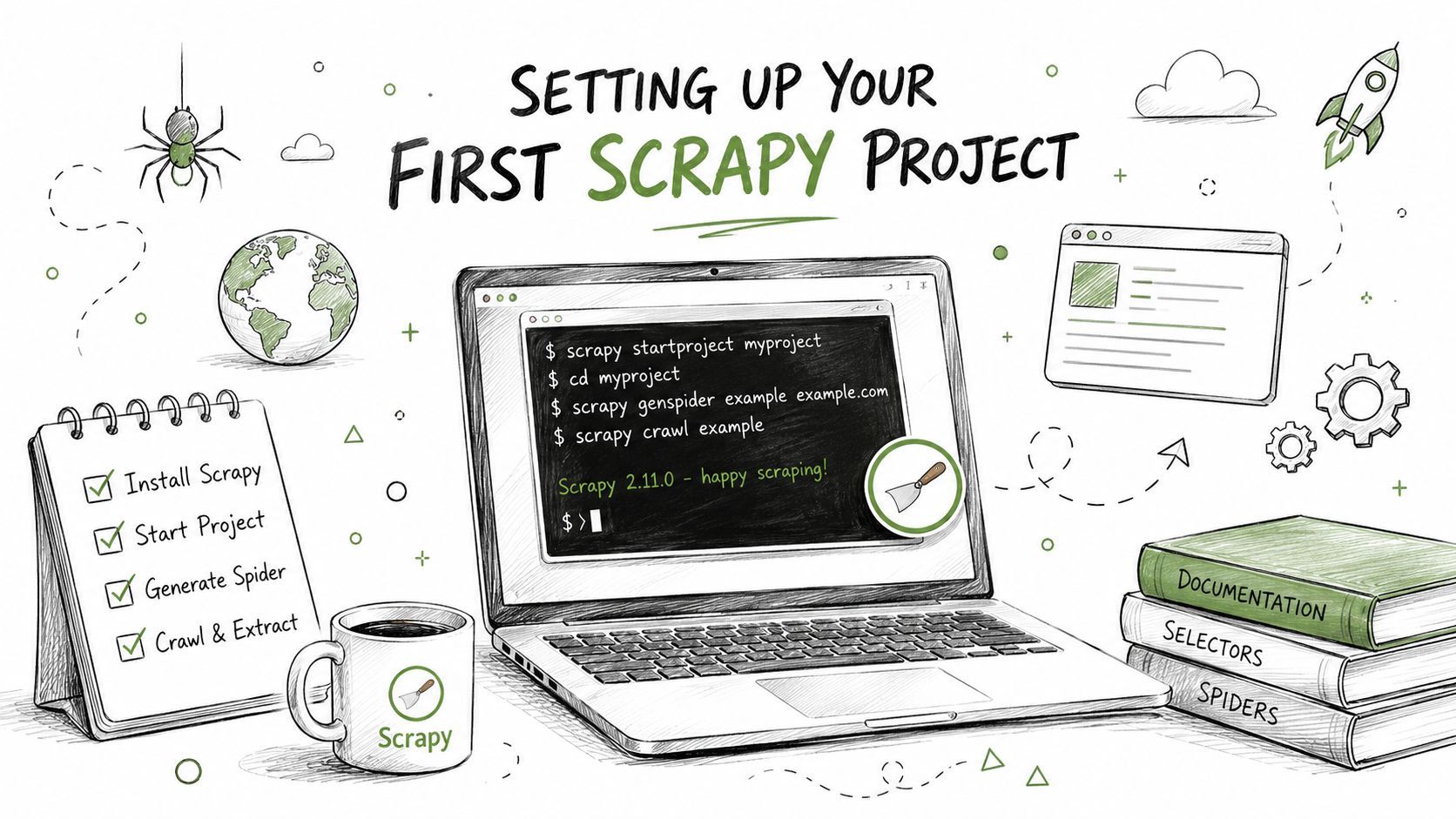
scrapy startproject catalog_crawler
cd catalog_crawler
scrapy genspider books books.toscrape.com
The generated project gives you a predictable layout. spiders/ contains crawl logic, items.py defines structured records, pipelines.py cleans and stores items, middlewares.py provides request and response hooks, and settings.py controls concurrency, delays, exports, and extensions. That separation keeps a spider focused on navigation and extraction instead of database code and retry policy.
Define the item before writing a large selector set. A small contract makes missing fields visible and gives pipelines a stable input shape.
# items.py
import scrapy

class BookItem(scrapy.Item):
    title = scrapy.Field()
    price = scrapy.Field()
    availability = scrapy.Field()
    detail_url = scrapy.Field()
A basic spider can then yield one BookItem per card and follow the next-page link.
# spiders/books.py
import scrapy
from catalog_crawler.items import BookItem

class BooksSpider(scrapy.Spider):
    name = "books"
    allowed_domains = ["books.toscrape.com"]
    start_urls = ["https://books.toscrape.com/"]

    def parse(self, response):
        for card in response.css("article.product_pod"):
            item = BookItem(
                title=card.css("h3 a::attr(title)").get(),
                price=card.css(".price_color::text").get(),
                availability=card.css(".availability::text").getall(),
                detail_url=response.urljoin(
                    card.css("h3 a::attr(href)").get()
                ),
            )
            yield item

        next_href = response.css("li.next a::attr(href)").get()
        if next_href:
            yield response.follow(next_href, callback=self.parse)
start_urls seeds the crawl. parse receives each response, loops over product cards, and yields items or new requests. get() returns one value, while getall() preserves multiple text nodes, which is useful when whitespace or nested markup splits a field. response.follow() resolves relative links without forcing you to assemble URLs manually.
Test selectors before running a crawl
Use the Scrapy shell to inspect a response interactively.
scrapy shell
Try selectors against the live response, check their results, and only then move them into the spider. This workflow catches incorrect nesting and relative-link mistakes before they become noisy crawl failures.
response.css("article.product_pod h3 a::attr(title)").getall()
response.css("li.next a::attr(href)").get()
Run the spider with an export while developing:
scrapy crawl books -O books.json
Keep the first run narrow. Verify that records contain expected values, pagination terminates, and optional fields remain acceptable when a page omits them.
The project's async direction doesn't require every callback to become complex. Start with clean spider boundaries, avoid blocking work inside callbacks, and migrate deliberately when you need coroutine-based APIs. That approach is safer than mixing event-loop assumptions into a spider copied from an older synchronous example.
Before moving to production extraction, watch the setup walkthrough for a visual overview of the project workflow.
Mastering Selectors for Data Extraction
Selectors are where most scraper defects begin. A request can succeed with a status code that looks healthy while the spider yields empty titles, stale prices, or the wrong link because the selector matched a navigation element instead of the record you wanted.
CSS selectors are usually the clearest starting point for class-based HTML.
title = card.css("h3 a::attr(title)").get()
price = card.css(".price_color::text").get()
image_url = response.urljoin(card.css("img::attr(src)").get())
XPath becomes more useful when you need relationships, conditional text, or structural navigation.
price = card.xpath(
    "normalize-space(.//p[contains(@class, 'price_color')]/text())"
).get()

detail_url = response.urljoin(
    card.xpath(".//h3/a/@href").get()
)
The choice isn't ideological. Use CSS when the markup exposes stable classes and the selector reads naturally. Use XPath when you need to select an element based on nearby text, move between ancestors and descendants, or normalize whitespace within the expression.
Test structure, not just happy paths
A selector that works on one page can fail when a site inserts a badge, removes an optional field, or changes the order of nested elements. Test representative responses in scrapy shell, then make absence explicit.
rating = card.css("p.star-rating::attr(class)").get()
labels = card.css(".availability ::text").getall()
availability = " ".join(text.strip() for text in labels if text.strip())
Avoid assuming that every .get() returns a value. Missing content should produce None, a controlled default, or a validation error in the pipeline, depending on the field's importance. Silent defaults are dangerous for identifiers and prices because they can create plausible but incorrect records.
The Scrapy benchmark suite separates page fetching, CPU-heavy extraction, broad crawl patterns, and selector performance, including CSS and XPath comparisons. That separation reflects a production reality: increasing network concurrency won't fix a parser that consumes excessive CPU, and a fast selector won't help if duplicate requests or an item pipeline becomes the bottleneck.
Measure downloads, parsing, item processing, and duplicate filtering separately. Optimizing only concurrency can move the bottleneck rather than remove it.
Pagination deserves the same care as field extraction. Prefer a server-provided next link when available, stop when it disappears, and guard against repeating the same URL. For APIs or predictable page parameters, maintain a clear termination condition and record the last successful page so a partial run can be diagnosed.
A useful mental model is to treat parsing as a data contract, not a string lookup. Define what makes an item valid, preserve the source URL, normalize values consistently, and document which fields are optional. For a broader explanation of the extraction stage, see this guide to parsing data.
Building Production-Grade Spiders with Pipelines and Middlewares
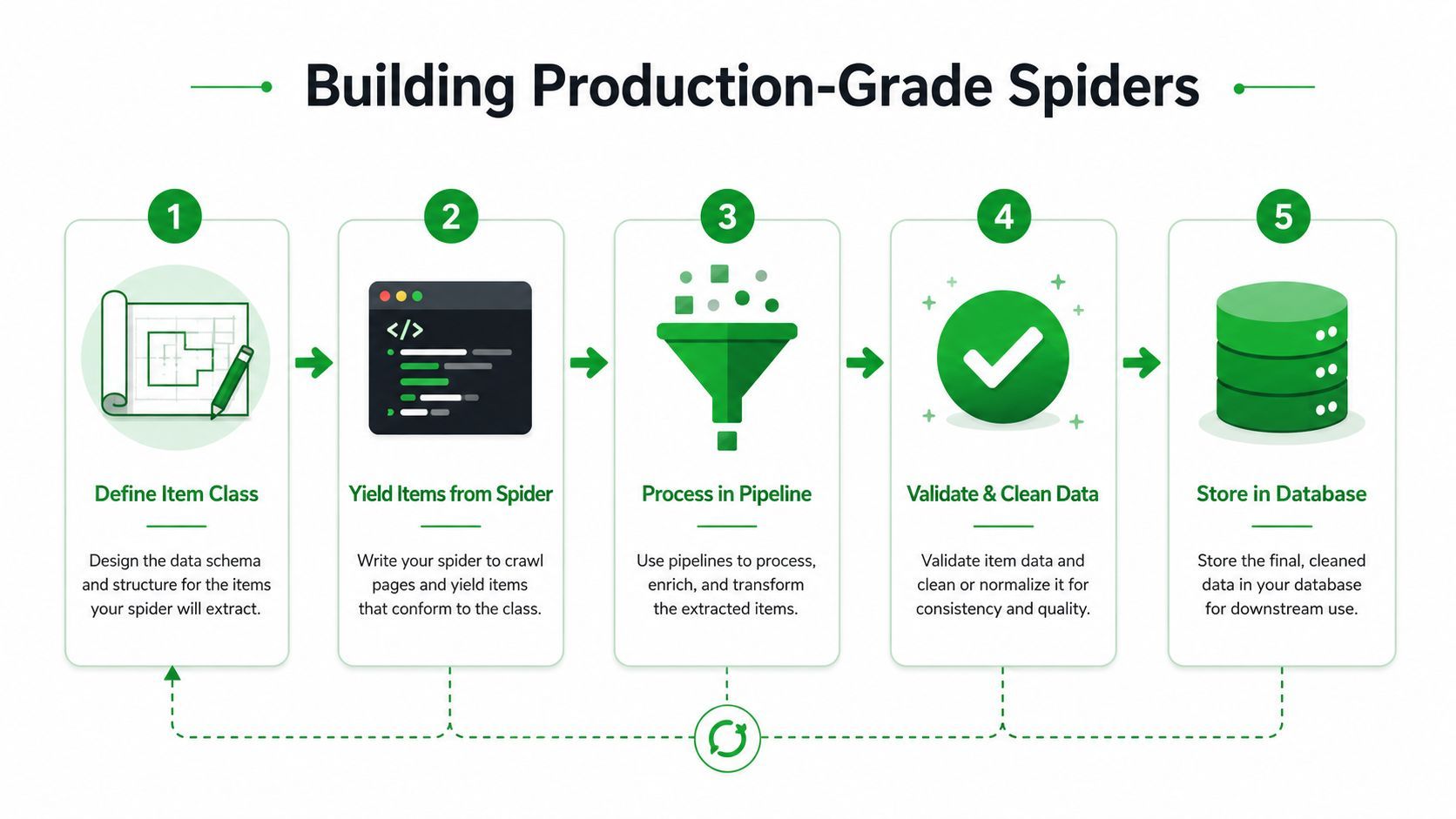
A spider that yields dictionaries proves that extraction works. It doesn't prove that the data is safe to store or that the crawler can recover from ordinary failures. Production reliability comes from making each boundary explicit.
Use an item definition to name the fields, then let a pipeline normalize and validate them. Strip whitespace, convert prices into a consistent representation, reject records without a stable identifier, and send malformed items to a review path rather than writing corrupt data.
# pipelines.py
class CleanBookPipeline:
    def process_item(self, item, spider):
        item["title"] = item["title"].strip() if item.get("title") else None
        item["price"] = item["price"].strip() if item.get("price") else None

        if not item["title"] or not item["detail_url"]:
            raise DropItem("Missing required book fields")

        return item
The pipeline is also the right place for deduplication, database writes, and schema-specific transformations. Keep network requests out of it where possible. Blocking database or filesystem work can undermine the concurrency you configured for downloads.
Middleware belongs around the request lifecycle
Downloader middleware can add headers, manage cookies, inspect response status codes, and implement carefully scoped retry behavior. Use retries for transient server and network errors, but don't blindly retry every 403 or 429. Repeating a blocked request at higher volume often worsens the problem.
Settings should express a crawl policy rather than a hope for maximum speed. CONCURRENT_REQUESTS, DOWNLOAD_DELAY, and AutoThrottle influence how aggressively the crawler talks to a site. Start conservatively, observe response behavior, and adjust per target. A single global setting rarely suits every domain.
| Concern | Scrapy control | Production decision |
|---|---|---|
| Request volume | CONCURRENT_REQUESTS | Limit pressure on each target |
| Request spacing | DOWNLOAD_DELAY | Add delay where the site needs it |
| Adaptive pacing | AUTOTHROTTLE_ENABLED | Let latency influence request speed |
| Recovery | Retry middleware and errbacks | Separate transient errors from blocks |
| Sessions | Cookies and cookie middleware | Preserve state only when required |
User-agent and proxy configuration should be lawful, transparent, and compatible with the target's rules. Proxies can distribute traffic, but they don't make prohibited access acceptable, and rotation won't solve a selector bug or a browser fingerprint challenge. Treat rotating proxies and bandwidth planning as infrastructure decisions, not as a substitute for responsible crawl behavior.
The most common engineering mistake is tuning concurrency before measuring the complete path. Selector cost, duplicate filtering, item validation, database writes, and exports can dominate runtime even when downloads are fast.
Handling JavaScript and Anti-Bot Systems
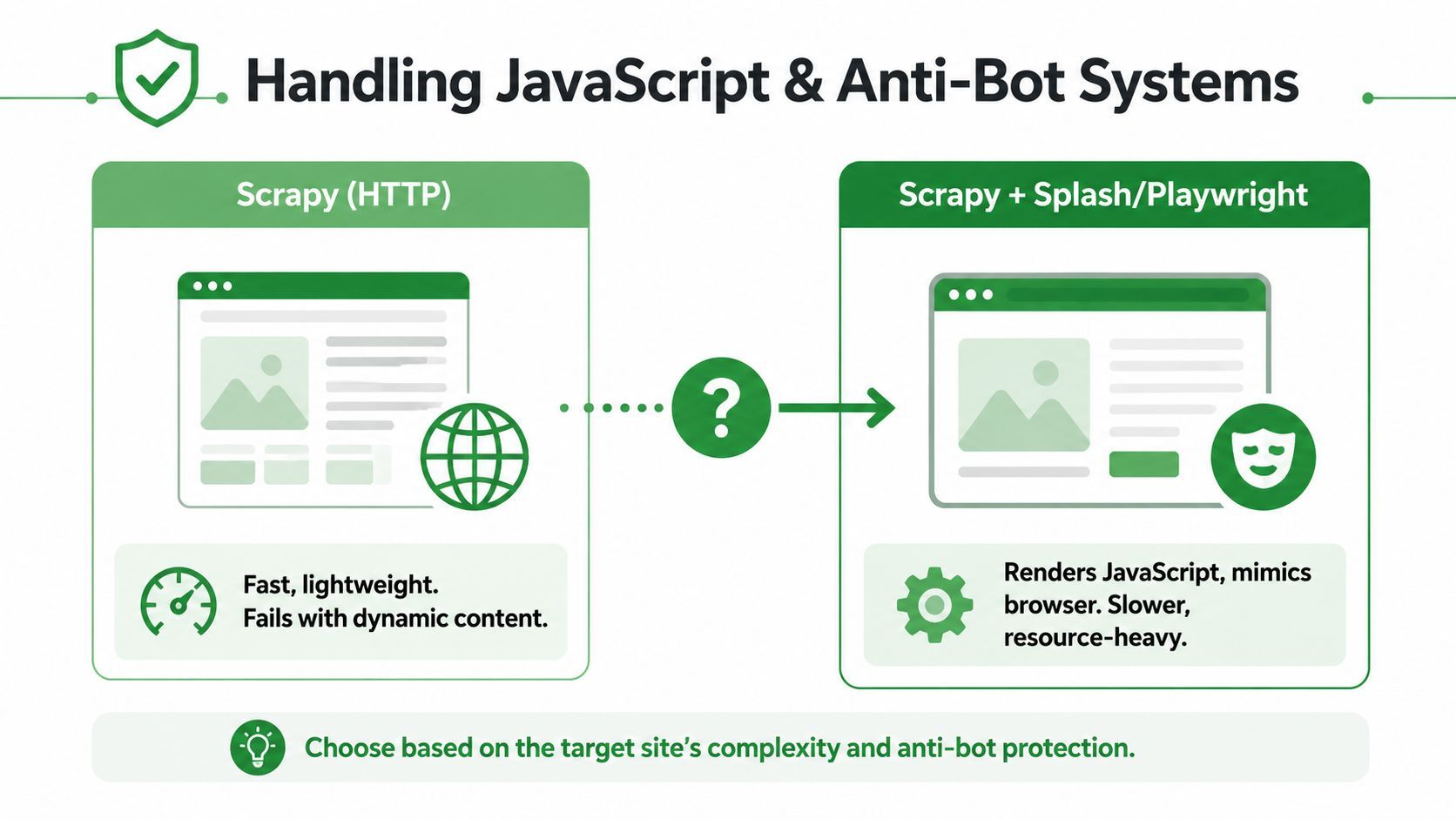
A page that looks dynamic in a browser isn't automatically a browser-automation problem. First inspect the raw response and browser network activity. Many sites render visible content from an API call or include the required data in the initial HTML, in which case Scrapy can request the underlying resource directly and remain fast and simple.
Browser automation becomes justified when the data appears only after client-side execution, interaction is required to reveal it, or the target evaluates browser characteristics that a plain HTTP client cannot reproduce reliably. Playwright can render the page and execute JavaScript, while integrations such as scrapy-playwright let a Scrapy project keep its scheduler, item flow, and pipelines around selected browser requests.
Decide per request, not per project
A hybrid design is usually more maintainable than turning every request into a browser page.
- Use Scrapy HTTP requests for stable HTML, documented endpoints, feeds, and pages whose data is present before rendering.
- Use Playwright selectively for login flows, client-rendered details, interaction-dependent content, or browser-only state.
- Keep browser work narrow by opening a page only when HTTP inspection proves necessary, then return extracted values to the normal item pipeline.
- Avoid Splash by default for new work unless its operational constraints match your environment and the target does not require capabilities better supported by a current browser tool.
Browser contexts consume more resources and introduce new failure modes, including page timeouts, context leaks, rendering differences, and synchronization bugs. They also make debugging slower because a failed extraction may involve navigation, JavaScript, network interception, and selector timing rather than one HTTP response.
Advanced bot systems can monitor request patterns and detailed browser fingerprints. Independent 2025 web scraping stack guidance identifies dynamic content, IP bans, honeypots, CAPTCHAs, and rate limits as persistent obstacles, while noting that browser automation is often necessary when plain HTTP requests don't match the expected browser behavior. The same discussion describes ecosystem support for HTTP/2, SOCKS proxies, and improved TLS settings, but those features don't guarantee access to a protected site.
Decision point: If the site needs a real browser to produce the data or accept the session, hand off that request. Don't make the entire crawler pay the browser cost when only a small route needs it.
Test the handoff with a narrow target and explicit success criteria. Confirm that the browser returns the expected content, that the request can be retried safely, and that the resulting item has the same schema as HTTP-extracted items. If the target presents a CAPTCHA or access control, respect the restriction rather than designing a system to defeat it.
Deploying and Monitoring Scrapy in Production
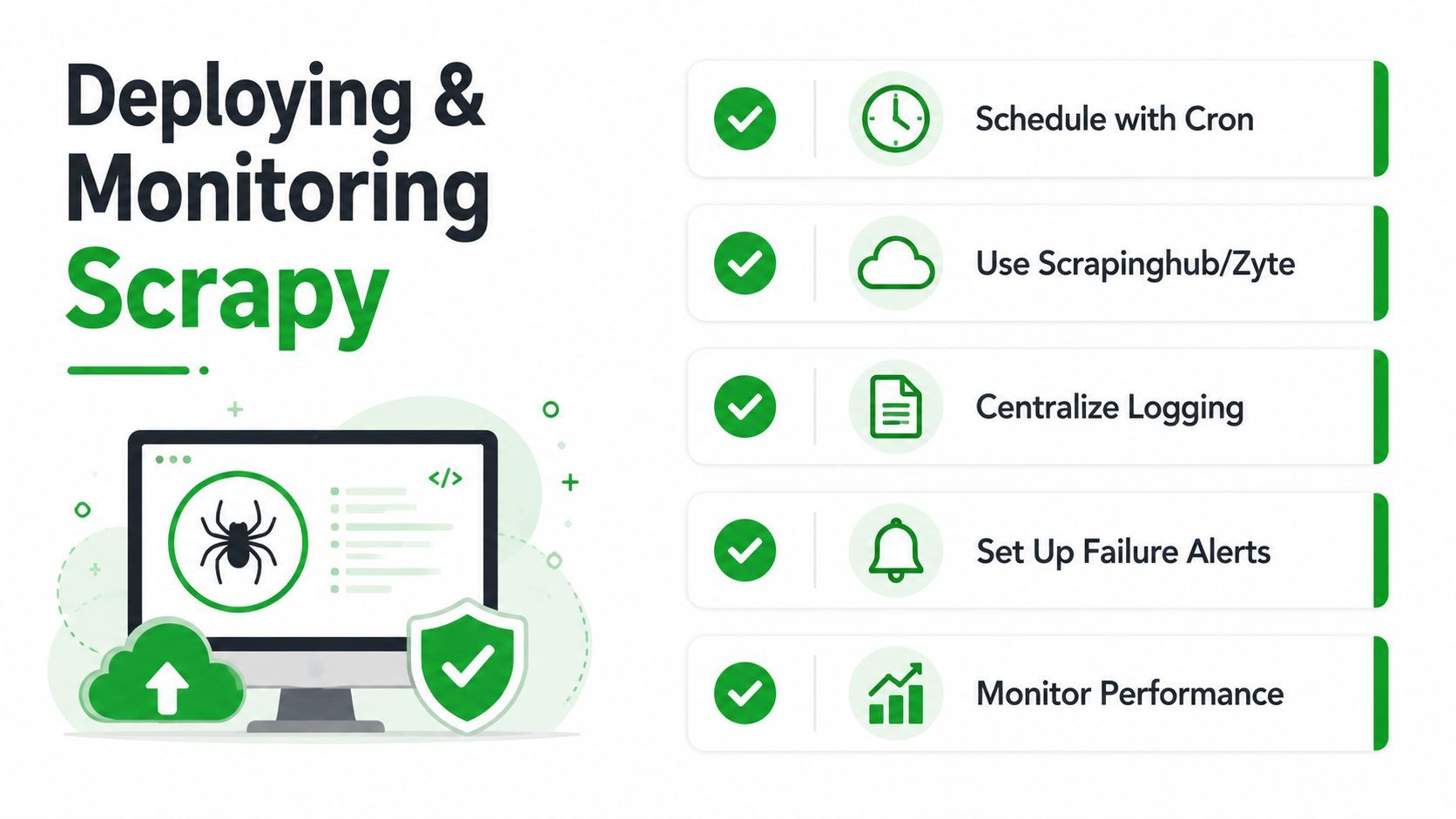
A crawler can finish with exit code zero and still deliver an empty dataset. Production operation requires a trigger, durable output, failure context, and alerts that separate parser breakage from a target returning no usable records. The async-first direction in Scrapy 2.13+ also affects deployment choices, especially when a spider must combine ordinary HTTP requests with a small browser-automation handoff.
For a small workload, schedule the spider and write a feed export to durable storage. Larger systems usually separate scheduling from execution, place jobs on a queue, and persist items through a database or object-storage pipeline. Choose based on recovery requirements, data volume, and the infrastructure the team already maintains. Keep browser work isolated to routes that need rendering or browser state, rather than paying that cost for every request.
Make every run observable
Scrapy assigns each spider a stats collection that opens when the spider starts and closes when it finishes. The default collector keeps counters such as request counts and timing data in memory, and the documentation exposes them through get_stats(), as described in the Scrapy statistics reference.
A successful process is not proof of a successful crawl. A selector can stop matching while the spider continues normally, so add custom counters for accepted items, dropped items, missing required fields, pagination stops, response-status classes, and validation failures.
Record at least:
- Run identity: Store spider name, start time, finish time, target, and deployment version.
- Request health: Capture request and response counters, retries, errors, and duplicate filtering.
- Output health: Compare item counts and required-field failures with an established qualitative baseline.
- Failure context: Preserve representative URLs, response statuses, exception details, and parser diagnostics.
- Alert conditions: Notify on empty output, abnormal drops, repeated retries, or a sudden rise in invalid items.
The benchmark documentation describes scrapy bench as a synthetic local test that uses a local HTTP server and a simple link-following spider. Its result is a hardware-specific ceiling, not a forecast for a real site with JavaScript, throttling, or anti-bot controls. Run it on the instance type planned for deployment, then compare it with production measurements using the official benchmarking documentation.
Choose storage deliberately
Feed exports suit development, replay, and batch delivery. Database pipelines fit normalized records and incremental updates, while object storage works well for raw response archives and downstream processing. Preserve enough source context to investigate a bad item without rerunning the entire crawl.
External service calls and persistence should appear as separate observable stages. Patterns in this API integration example reinforce the need for explicit authentication, error handling, and response validation in downstream integrations.
Common Pitfalls and Best Practices Checklist
Production failures usually come from assumptions that were never made explicit. A spider assumes every page has the same markup, every next link advances, every response can be retried, and every successful process produced valid data. Those assumptions eventually turn a clean crawl into a misleading dataset.
Use this checklist before deployment:
- Respect site rules: Review robots.txt, terms, access controls, and applicable law before crawling.
- Control pressure: Set concurrency and delays per target, then observe responses instead of maximizing request volume.
- Bound pagination: Stop on missing or repeated next links, and protect against loops.
- Validate items: Reject missing identifiers and required fields in a pipeline.
- Separate retries: Retry transient failures carefully, but don't treat blocks as ordinary network errors.
- Preserve provenance: Store source URLs, crawl timestamps, and enough raw context to debug changes.
- Test optional fields: Exercise pages with absent badges, missing images, alternate layouts, and empty values.
- Monitor output: Alert on empty runs, abnormal item counts, rising drops, and parser exceptions.
- Keep browser handoffs narrow: Use Playwright only for requests that need rendering or browser state.
- Write for current Scrapy: New code should account for the asyncio reactor, the deprecation of
start_requests(), and coroutine APIs introduced across recent releases, as recorded in the Scrapy release notes.
Don't copy an old synchronous pattern into a new project without checking its reactor assumptions. At the same time, don't rewrite every callback as async merely to appear modern. Migrate in small slices, keep pipelines schema-compatible, and test mixed HTTP and browser requests independently.
The strongest Scrapy systems are deliberately boring. They fetch only what they need, yield validated items, expose useful counters, slow down when targets require it, and escalate to browser automation only at a clear technical boundary.
If your product needs reliable YouTube media ingestion rather than a crawler you must constantly patch, YouTube Download API provides an asynchronous REST workflow for metadata, video or audio retrieval, clipping, and machine-readable failures. Visit the service to evaluate whether its managed bot handling and CDN-backed download flow can remove the browser, cookie, and proxy maintenance from your pipeline.