---
title: 'Model Context Protocol Explained: Architecture and Uses'
description: 'Model Context Protocol explained: client-host-server architecture, core components, transports, security limits and real-world applications.'
url: https://vidkraken.com/blog/model-context-protocol
author: Dalvo
published: '2026-11-03'
updated: '2026-11-03'
---
# Model Context Protocol Explained: Architecture and Uses
> Model Context Protocol explained: client-host-server architecture, core components, transports, security limits and real-world applications.
Dalvo · Published 2026-11-03
Source: https://vidkraken.com/blog/model-context-protocol
You've wired an AI assistant to one database. Then someone asks for files, then for a video download, and suddenly you're writing a fresh integration for every tool, for every assistant your team tries. The **Model Context Protocol** exists to stop that repetition. It gives you one shared way for AI applications to reach external tools and data, and a clear set of boundaries for who approves access, who holds credentials, and who does the work.
## Table of Contents
- [What Model Context Protocol Does for AI Tools](#what-model-context-protocol-does-for-ai-tools)
- [The Arithmetic That Makes It Worthwhile](#the-arithmetic-that-makes-it-worthwhile)
- [Host, Client and Server Roles Explained](#host-client-and-server-roles-explained)
- [The Host Owns the User Relationship](#the-host-owns-the-user-relationship)
- [One Client per Server](#one-client-per-server)
- [The Server Exposes Capabilities](#the-server-exposes-capabilities)
- [Tools, Resources and Prompts Compared](#tools-resources-and-prompts-compared)
- [Tools Do Things](#tools-do-things)
- [Resources Provide Context](#resources-provide-context)
- [Prompts Capture Repeatable Workflows](#prompts-capture-repeatable-workflows)
- [Following One Request from Start to Finish](#following-one-request-from-start-to-finish)
- [Watching the Flow](#watching-the-flow)
- [Choosing a Transport and Securing the Connection](#choosing-a-transport-and-securing-the-connection)
- [Stdio for Same Machine Work](#stdio-for-same-machine-work)
- [Streamable HTTP for Remote Servers](#streamable-http-for-remote-servers)
- [Where Authorization Gaps Appear at Scale](#where-authorization-gaps-appear-at-scale)
- [A Concrete Authorization Model](#a-concrete-authorization-model)
- [Decide Whether to Build or Connect an MCP Server](#decide-whether-to-build-or-connect-an-mcp-server)
- [Your Next Five Steps](#your-next-five-steps)
## What Model Context Protocol Does for AI Tools
Say your assistant needs to read a project database, open a shared file, and submit a video download. Without a shared standard, you write custom code for the database in this assistant, then again when you add a second assistant, then a separate version for files, and another for downloads. Each pairing has its own request format, error handling, and sign-in flow. That's the integration problem the **Model Context Protocol** is meant to reduce.
**USB-C** offers a useful comparison. One port shape lets many chargers, drives, and screens work with many laptops, so you don't carry a different cable for every pair. MCP does the same for AI tools. It's an **open standard** that lets an AI application connect to external capabilities through one shared interface.
### The Arithmetic That Makes It Worthwhile
Without a shared protocol, **N assistants and M tools need N times M custom integrations**. Three assistants and four tools mean twelve separate builds. With MCP, each assistant implements the protocol once and each tool implements it once, so the count drops to **N plus M**, or seven in that example. Adding a fifth tool means building one server, not three more integrations.
That's different from a direct **REST API** integration, where you wire each endpoint into each assistant by hand and teach that assistant how to call it. It's also different from vendor-specific **function calling**, where you define tools inside one vendor's request format and rewrite them when you move. MCP moves the **tool catalog** and the invocation messages into a shared protocol, so a server built once works across compatible hosts, and the host discovers what the server offers instead of hard-coding it.
A server exposes three kinds of things to a model, **tools, resources, and prompts**, and messages between the parts use **JSON-RPC 2.0**.
> If you're writing the same glue code for a second assistant, you've got the problem MCP was built for. If you've got one assistant and one stable tool, a direct integration may be simpler.
## Host, Client and Server Roles Explained
Confusion starts here, because people often use client to mean the whole AI app. In MCP, the three roles split responsibilities, and the split tells you where security decisions belong. The [Model Context Protocol architecture specification](https://modelcontextprotocol.io/specification/2026-07-28/architecture/index) describes a **client-host-server architecture over JSON-RPC 2.0**, where a host can create multiple client instances, each maintaining an isolated connection to a server, and the host stays responsible for security policies and user-consent enforcement.
| Role | What it is | Example | Main responsibility |
| ------ | ------------------------------------------------- | ------------------------------------------------- | --------------------------------------- |
| Host | The AI application the user works in | Desktop assistant or IDE assistant | User consent and security policy |
| Client | Connector the host creates, one per server | One client for each connected MCP server | Isolated connection to a single server |
| Server | Program that exposes tools, resources and prompts | Local file server or remote video-download server | Capabilities it advertises and executes |
### The Host Owns the User Relationship
The **host** is what the person sees, such as a desktop assistant or an IDE assistant. It decides which servers the user may connect to, asks for approval before sensitive actions, and enforces policy. If consent isn't handled here, it usually isn't handled well anywhere, because the server can't see the user interface or the conversation context.
### One Client per Server
The host creates a separate **client** for each server connection. A realistic host might hold three clients at once, one for a file server, one for a database server, and one for a remote video-download server.
- **Isolation:** One server can't read another server's traffic through its client.
- **Separate connections:** A slow or failing server doesn't block the others.
- **Clear accounting:** The host knows which client sent which request.
### The Server Exposes Capabilities
The **server** advertises tools, resources, and prompts and executes what it's asked to do. It may run on the user's machine or remotely. That separation means a client can discover a remote video-download server's tools and invoke them without the host embedding download infrastructure, proxies, or retry logic.
Requests are designed to be **self-contained**, carrying protocol-version and capability information rather than depending on hidden server-side session state. That helps horizontal scaling, because any server instance can handle a request. The **transport layer** handles connection setup, framing, cancellation, and authorization, while the **data layer** defines tools, resources, prompts, notifications, and capability negotiation.
Before you build, run this test on your design. **Name the component that holds user consent and the component that holds the credentials.** If you can't point to both, your boundary is unclear.
## Tools, Resources and Prompts Compared
These three primitives sound similar, and picking the wrong one creates muddled permissions. A media workflow makes the distinction concrete. If you're new to the pattern of [connecting AI agents through MCP](https://post-pulse.com/blog/what-is-mcp-server), start by sorting every capability into one of these three buckets.
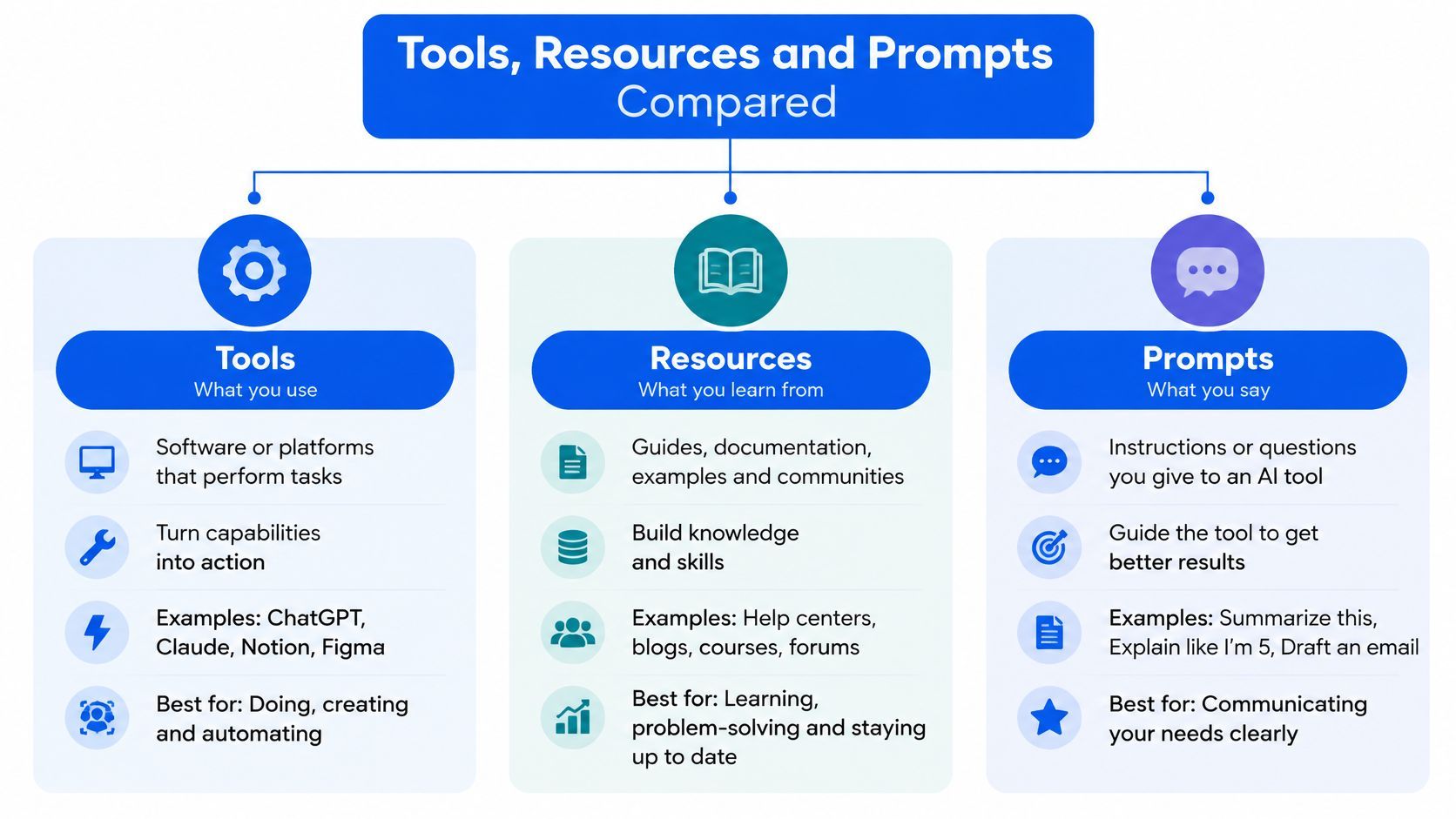
| Primitive | Who initiates it | Effect | Media example |
| --------- | ---------------------------- | ---------------------------- | ------------------------------------------------- |
| Tools | Model invokes with arguments | Can change state | Submit a download job or check job status |
| Resources | Application reads by URI | Read-only | A file's contents or a video's title and duration |
| Prompts | User selects a template | Starts a repeatable workflow | Standard clipping request or transcription brief |
### Tools Do Things
**Tools** are functions the model can invoke with arguments. Submitting a download job with a video URL and optional start and end times is a tool, and so is checking that job's status. Because a tool can change state, spend money, or create files, the host should confirm side-effect actions, such as starting a paid download, with the user before the call runs. The model proposes, the person disposes.
### Resources Provide Context
**Resources** are read-only data identified by a **URI**. A file's contents, or a video's title and duration, fit here. The application reads them to give the model context, and reading shouldn't create a job or charge an account. If you already offer an audio workflow such as our [YouTube to MP3 API](https://vidkraken.com/youtube-to-mp3-api), metadata about a track belongs in a resource, while creating the audio file belongs in a tool.
### Prompts Capture Repeatable Workflows
**Prompts** are reusable templates a user selects, such as a standard clipping request or a transcription brief. They keep your team from retyping the same instructions and make the workflow explicit, instead of hiding it in one person's chat history.
Two supporting ideas round this out. **Notifications** let a server tell the client its tool or resource list has changed, so the host doesn't show stale options. **Capability negotiation** happens when the server announces what it supports as the connection starts and the client adapts to that list.
> **Rule of thumb:** Use tools for actions with effects, resources for reading context, and prompts for repeatable workflows a user chooses.
Your design decision is simple to state and easy to get wrong. Which operations deserve a tool, and which data can stay a read-only resource?
## Following One Request from Start to Finish
A user asks their assistant to download a three-minute clip from a conference talk and transcribe it. This is the diagram of that round trip, from connection to closure.
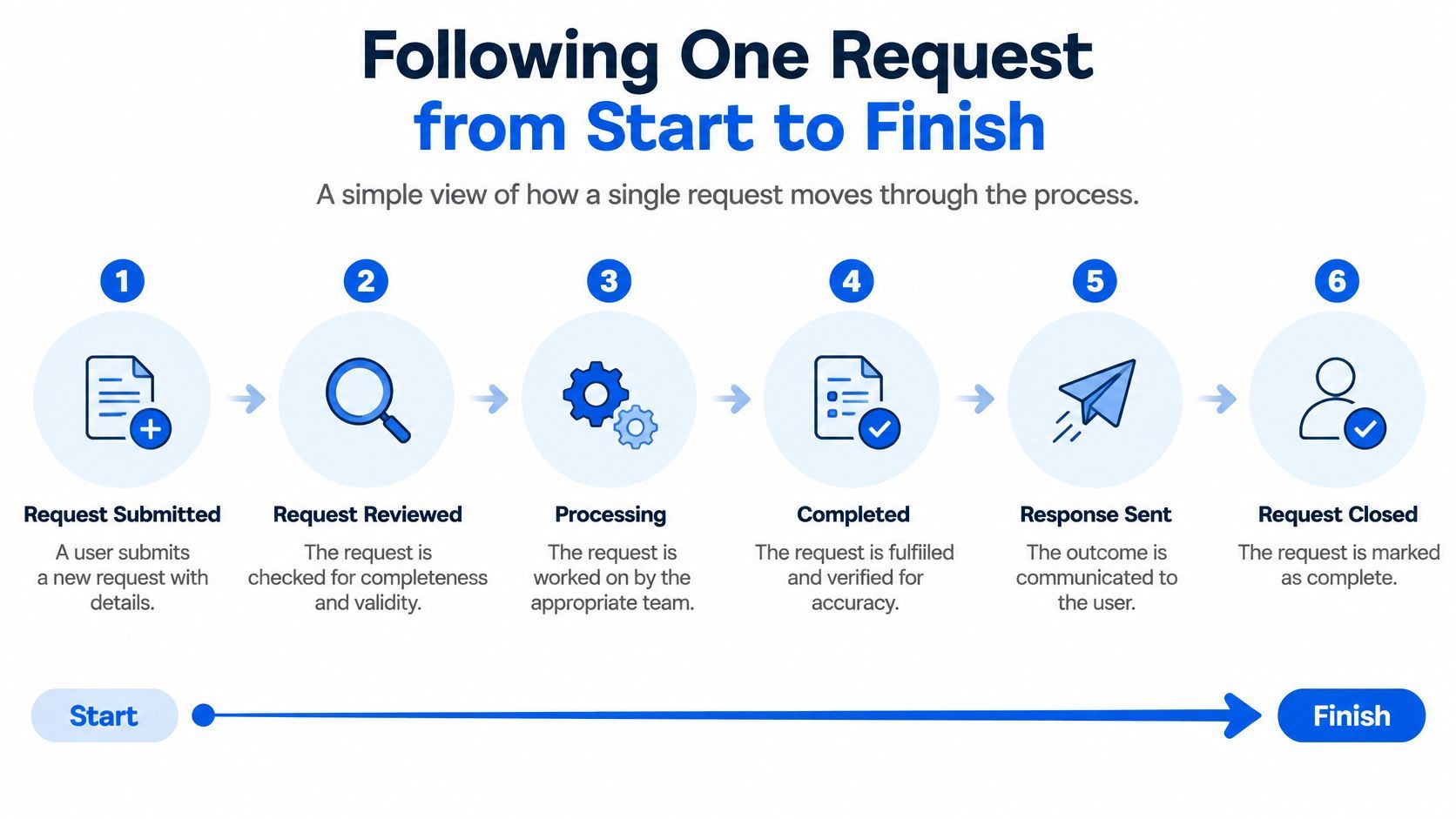
1. **Connect.** The host starts a client, which connects to the remote video-download server. Nothing has been downloaded yet.
2. **Discover capabilities.** The client requests the server's capability list, and the server returns its tools, so the model knows what's available.
3. **Choose a tool.** The model selects the submit-download tool and fills in the video URL and the start and end times for the three-minute segment.
4. **Confirm with the user.** The host shows a confirmation prompt before any action with an effect runs. That is where a paid or large download gets a human check.
5. **Accept the job.** The server accepts the request and returns a **job ID**. Downloads take time, so the server works asynchronously instead of holding the conversation open.
6. **Poll for completion.** The client checks job status until it completes, then receives a direct **HTTPS link** and the file size.
7. **Hand off to a second server.** The model passes that link to a transcription tool on another server. Each server does one job, and the host coordinates them.
8. **Handle restrictions cleanly.** If the video is restricted, the server returns a structured error such as private, geographic, age, membership, or DRM, and the assistant explains the restriction instead of retrying blindly.
### Watching the Flow
This short video walks through a similar exchange, so you can see where the model, client, and server each act.
Notice where the boundaries sit. The model chooses and fills arguments, the host confirms, the server executes, and errors come back in a form the assistant can explain. Our worked [API integration example](https://vidkraken.com/blog/api-integration-example) shows the same submission and polling shape outside MCP, which helps if you're comparing the two paths.
Trace this path in your own system before you ship. **Mark where a human approval, a log entry, and an error handler should go.** If any of those three has no home, that's your first fix.
## Choosing a Transport and Securing the Connection
Transport is where MCP meets the live network, and where local convenience can become remote exposure. The [MCP authorization specification](https://modelcontextprotocol.io/specification/draft/basic/authorization/index) models a protected MCP server as an **OAuth 2.1 resource server** and requires **OAuth 2.0 Protected Resource Metadata** for discovery, with authorization endpoints using HTTPS and redirect URIs limited to localhost or HTTPS.
| Transport | Best for | How messages flow | Security needs |
| --------------- | ------------------------------------- | ---------------------------------------------------------------------------------- | ------------------------------------------------------------------------------------------------------------- |
| stdio | Same-machine local servers | Host launches the server as a subprocess and talks over standard input and output | Trust the local process; no network exposure |
| Streamable HTTP | Remote, independently running servers | Client sends HTTP POST requests; server may stream replies over Server-Sent Events | Validate Origin header, bind local services to 127.0.0.1, authenticate, use HTTPS for authorization endpoints |
### Stdio for Same Machine Work
With **stdio**, the host launches the server as a subprocess and exchanges messages over standard input and output. There's no network overhead and no listening port, which suits a local file server or a personal tool. Your trust question is about the process itself, because you're running its code under the user's account.
### Streamable HTTP for Remote Servers
**Streamable HTTP** suits independently running, remote servers. The client sends **HTTP POST** requests, and the server can optionally stream messages back over **Server-Sent Events**. That's the practical choice for a shared video-download service that many hosts connect to.
Apply these controls before you expose an HTTP server.
- **Validate the Origin header:** This reduces DNS-rebinding risk, where a malicious web page tries to reach a local service through the browser.
- **Bind local services to 127.0.0.1:** Don't bind to 0.0.0.0 unless you mean to accept traffic from the network.
- **Authenticate every connection:** Bearer-token or OAuth-based access control keeps an open endpoint from becoming a free, anonymous tool.
- **Keep credentials out of tool arguments:** Tokens shouldn't appear in model-visible parameters, where they can be echoed, logged, or leaked into prompts.
- **Require explicit consent:** Get the user's approval before any user data reaches a server.
For restricted or unavailable media, return **structured, machine-readable errors** rather than vague failures, and never imply an access control can be bypassed.
> Pick the transport from where the server runs, then apply the matching controls before you expose it, not after the first external user connects.
Transport security gets a request safely to the door. Whether that request should be allowed for this user and this tenant is a separate, harder question.
## Where Authorization Gaps Appear at Scale
Here's the part introductory coverage tends to skip. MCP can expose arbitrary data-access and code-execution paths, yet the protocol itself can't enforce consent, access control, or privacy policy. Each host and server must implement those controls.
The [2026-07-28 Model Context Protocol specification](https://modelcontextprotocol.io/specification/2026-07-28) sits alongside an assessment finding that MCP doesn't define how sessions map to identities and lacks protocol support for exchanging role-based access-control permissions when a connection is created. Authorization is optional, implementations commonly rely on bearer tokens or session identifiers, and token refresh, revocation, and reuse prevention aren't specified at the protocol level.
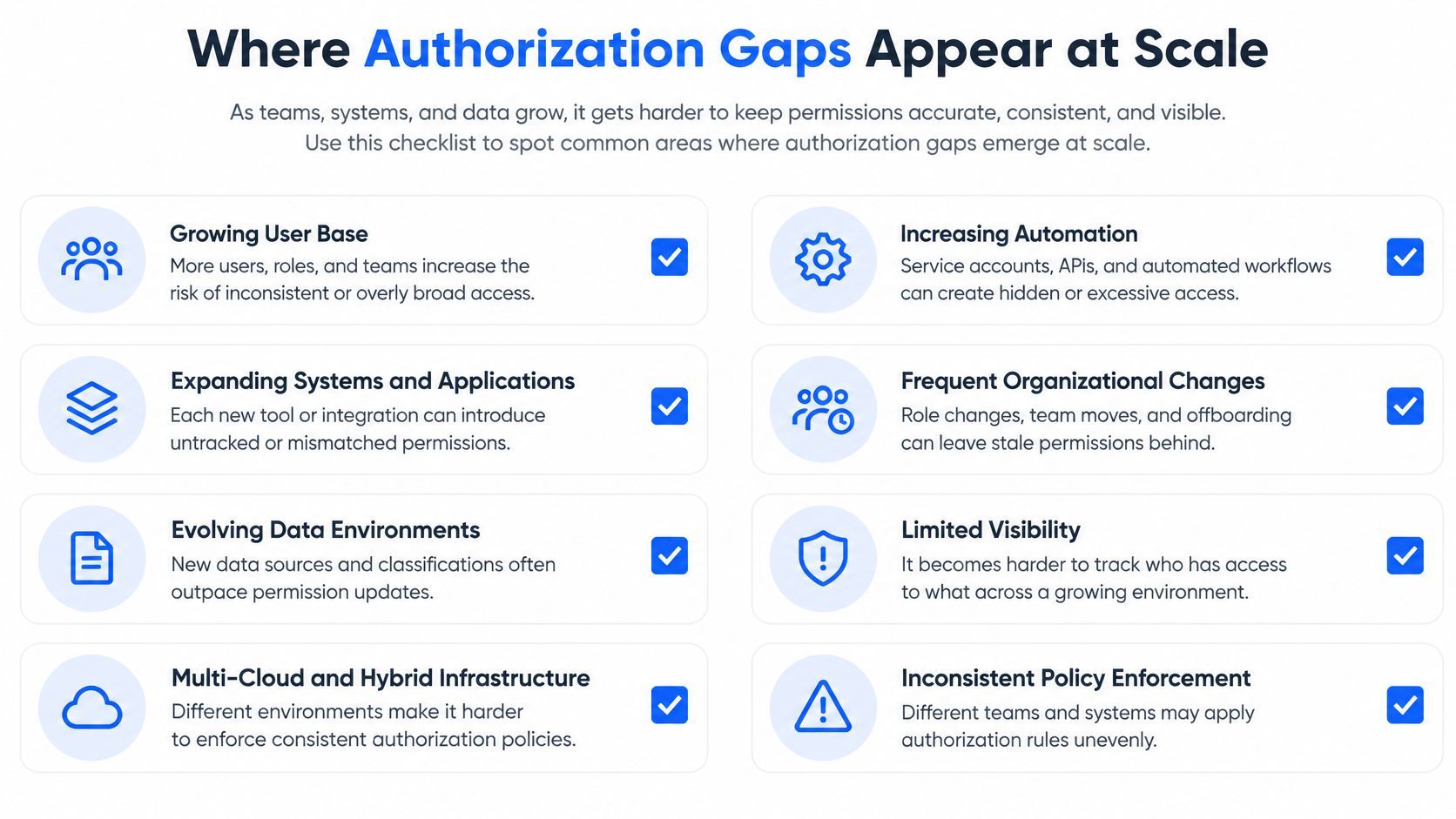
Say one MCP server submits downloads for many customers. A request arrives with a valid token. Which tenant does it belong to, which person approved it, and may that person use the download tool, or only read metadata? The protocol won't answer that for you, so you need your own model.
### A Concrete Authorization Model
1. **Bind every request to a tenant and user identity.** Don't let a connection stand in for a person.
2. **Issue audience-restricted, short-lived tokens.** A token minted for one server shouldn't work at another, and it shouldn't live for months.
3. **Define per-tool scopes.** Reading a video's title and submitting a billed download aren't the same permission.
4. **Prevent token passthrough.** Don't forward the incoming token to downstream APIs, where it gains a second, unaudited life.
5. **Log authorization decisions without secrets.** Record who, what, and allowed or denied, never the token itself.
6. **Revoke sessions centrally.** When someone leaves a team, one action should cut their access everywhere.
Apply that to media workflows. Saying the agent is authorized isn't enough. Your system should prove **which user authorized which video, which operation, and which delivery destination**, because those three facts decide whether a download was legitimate.
Run this test today. Pick any download in your logs. **Can you name the person who approved it?** If you can only name the agent or the API key, your authorization boundary needs work before you add more tenants.
## Decide Whether to Build or Connect an MCP Server
Start with a decision rule you can apply in a planning meeting. **Connect to an existing server** when the capability is already offered and the data is public or licensed to you. **Build your own** when the data is internal, the logic is specific to your product, or your compliance rules require you to control execution.
Vid Kraken offers a remote MCP server listed in the official MCP Registry as **com.vidkraken/vidkraken**, which lets Claude and other AI agents use Vid Kraken directly. It uses **OAuth 2.1 with PKCE**, so users sign in with their VidKraken account and approve access, with no API key to paste into the client. MCP usage is billed the same way as direct API calls, and a second read-only docs server lets agents search documentation without signing in.
Building your own server also means owning isolation between tenants and between tools. If you run server code you didn't write, [Beam's guide to MCP server isolation](https://www.beam.cloud/blog/mcp-server-sandbox) is worth reading before you decide how much you trust that process. Check the capability and authentication details in our [developer documentation](https://vidkraken.com/docs) against your client's supported protocol version before you commit.
### Your Next Five Steps
1. **Confirm the protocol version** your client supports, so discovery and tool calls match the server.
2. **List the tools and resources you need.** Keep the first version small, and leave read-only data as resources.
3. **Choose the transport** from where the server runs, local or remote.
4. **Write the authorization model and its scopes** on paper, including tenant identity and revocation.
5. **Test error handling** for restricted or unavailable content, and make sure the assistant explains it plainly.
You can make this decision this week. If a maintained server already covers your capability, connect to it, define your scopes, and spend your engineering time on the workflow your users see.
---
If you need an AI agent to fetch clips and metadata without running download infrastructure yourself, our remote MCP server connects Claude and other compatible agents through OAuth sign-in, while we handle the proxies, retries, and restricted-content errors behind it. Visit [Vid Kraken](https://vidkraken.com) to connect your agent or explore the API for your next media workflow.