API with JavaScript: Fetch, Errors and Retries
Learn how to call an API with JavaScript using fetch, read responses, handle errors and retry safely, with practical code patterns for api with javascript.
Dalvo · November 27, 2026
Most tutorials on calling an API with JavaScript hand you the same five-line snippet: call fetch, check response.ok, parse the JSON, and wrap the whole thing in a retry loop if a request fails. Follow that advice in production against a media processing or job-based REST service, and you'll break your app in two expensive ways. First, you'll treat accepted or partially failed jobs as completed downloads because HTTP returned a 2xx status. Second, you'll retry timed-out job creation requests and bill your account twice for the exact same file.
In production backend code, a successful HTTP response is the beginning of verification, not the end. Every request has to prove its body is valid JSON, confirm the remote job reached a finished state, and distinguish between safe reads and side-effecting writes before a single retry fires. Here is how to structure those calls cleanly using native JavaScript tools.
Table of Contents
- Make Your First API Call with fetch
- Read the Response Without Assuming Success
- Map Status Codes and Error Codes to Actions
- Poll Long Jobs Without Hanging Your App
- Retry Only Requests That Are Safe to Repeat
- Test One Request Before You Ship Your Integration
Make Your First API Call with fetch
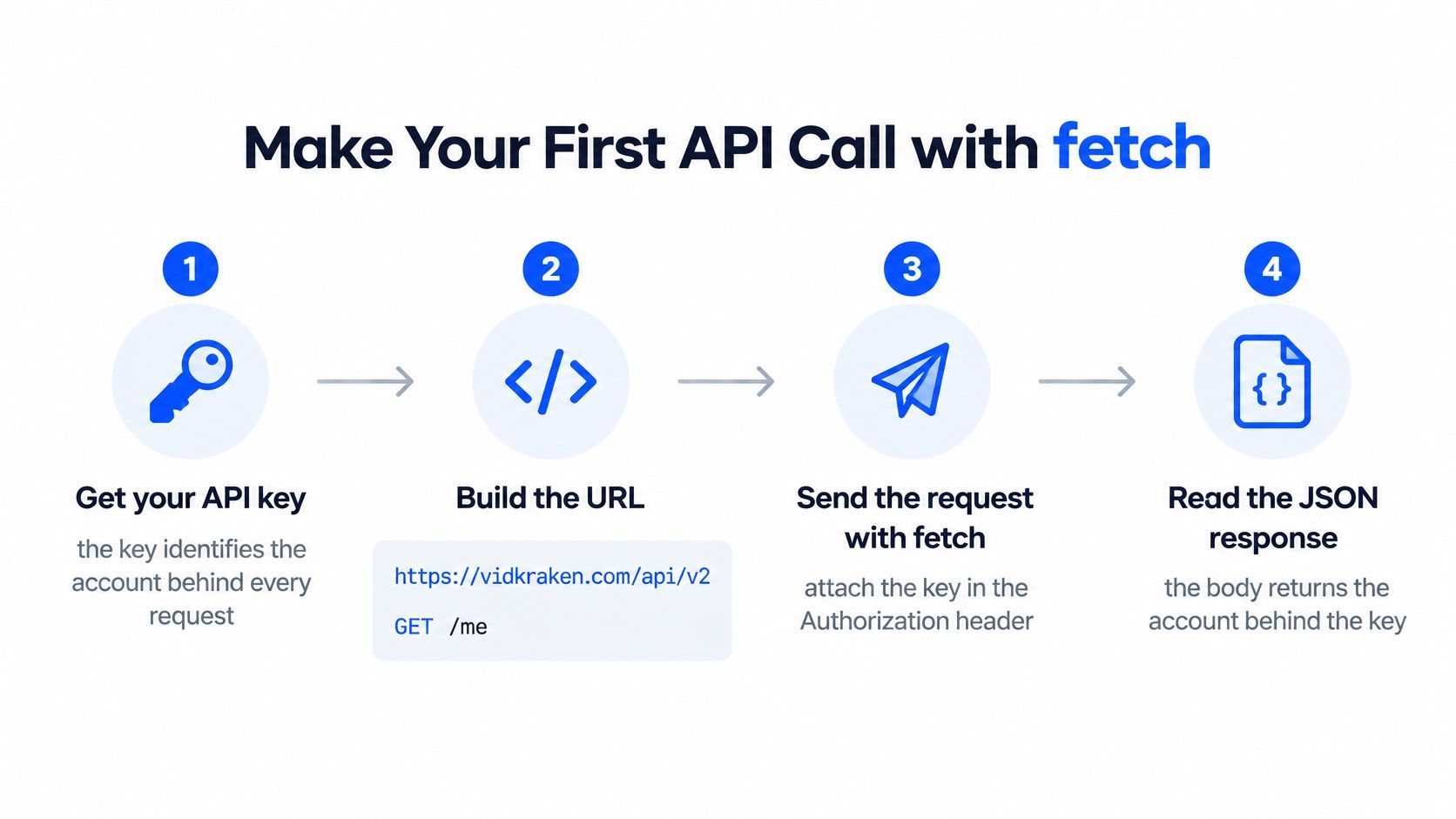
Before you write download queues or webhook listeners, run the smallest authenticated request that proves your credentials and network path work. Against Vid Kraken's version 2.0 REST interface at https://vidkraken.com/api/v2, that test is a GET /me call, which returns the account behind your API key along with its active plan and the live balance on every metered feature. Because the service is a plain REST API, you don't need an SDK to run this check, and polling endpoints like /me are free to call.
Native fetch replaced XMLHttpRequest as the standard, promise-based interface for HTTP requests in modern browsers and Node.js. According to MDN's XMLHttpRequest documentation, XMLHttpRequest has been available across browsers since July 2015, and it powered the early AJAX era through nested callbacks. Moving to fetch gives you composable promises, cleaner error boundaries, and shared syntax across browser tabs, web workers, and Node.js servers.
Here is the minimal working request to verify your key in Node.js: call const response = await fetch('https://vidkraken.com/api/v2/me', { headers: { Authorization: 'Bearer ' + process.env.VIDKRAKEN_API_KEY } });, verify if (!response.ok) throw new Error('HTTP ' + response.status);, and parse the payload with const account = await response.json();. Wrap those three statements inside a try and catch block so connection dropouts don't crash your process unhandled.
The diagram below traces that four-stage flow from issuing your key to reading the returned account JSON.
Why Every Line in That Request Matters
Getting that first call right prevents the authentication and parsing bugs that eat hours later in a sprint. Follow these six steps in order whenever you wire up a new endpoint:
- Store the API key in a server-side environment variable. Grab your key from the Vid Kraken dashboard at
https://vidkraken.com/loginand load it fromprocess.env, never inside client-side browser bundles where any visitor can open DevTools and copy your credentials. - Assemble the full endpoint URL explicitly. Combine the versioned base
https://vidkraken.com/api/v2with the exact resource path/me(or use the nativeURLconstructor) so you never accidentally drop a slash or hit a deprecated route. Vid Kraken versions the API in the path as/api/v2and makes only backward-compatible changes within that version, so a URL you build today keeps working. - Pass credentials in the
Authorizationheader as a Bearer token. SendingAuthorization: Bearer <your_key>keeps authentication out of query strings, where keys leak into proxy logs and browser history. - Set
Content-Type: application/jsonwhenever you attach a request body. AGET /mecall sends no body, so you omit this header. Once you send aPOSTto/downloadwith a JSON payload containing a video URL and format options, missing that header causes the server to reject or misread your body. - Check
response.okbefore callingresponse.json(). Unlike older wrapper libraries such as Axios,fetchdoesn't reject its promise on a400,401, or500response. It only rejects when the network itself fails, so skipping theresponse.okguard sends error payloads straight into your happy-path code. - Isolate network exceptions with
tryandcatch. A DNS lookup failure, dropped socket, or TLS handshake error throws before anyResponseobject exists. Catching those errors separately from HTTP status failures lets you log transport outages cleanly instead of blaming the API payload.
A passing GET /me response tells you more than "the key works." The returned object confirms which plan the key belongs to and shows the current balance on each metered feature, so you can verify that the account you think you're billing is the account answering your requests. That matters in teams where staging and production keys live side by side in the same environment file, and a copy-paste mistake routes production traffic through a test plan.
Run the check once from every environment you ship: local machine, CI runner, and production container. DNS resolution and egress firewall rules differ across all three, and a key that works on your laptop can still fail behind a corporate proxy. When the call succeeds everywhere, your environment variable, Bearer formatting, and outbound HTTPS connectivity are proven before you queue a single media job.
Read the Response Without Assuming Success
A 2xx response from an API with JavaScript is the start of verification, not the finish line. With a download pipeline, response.ok only means the HTTP message was received and answered with a status between 200 and 299. A submission request can succeed while the download job is still queued or has failed. The job state has to be checked separately. Silent data corruption starts when response.ok is treated as proof that media is ready.
Production rule: Treat
response.okas a transport check, never as proof that the requested operation succeeded.
Parsing blindly creates a second failure mode. When a reverse proxy, CDN, or load balancer hits an upstream timeout, it may return a 5xx gateway error with an HTML error page instead of JSON. If your code jumps straight to await response.json(), JavaScript throws a SyntaxError: Unexpected token '<' that hides the HTTP status from your logs and alerts. That is a poor trade at the edge of a media pipeline, because the actual fault is upstream, while the visible error looks like malformed JSON.
Five Checks to Run on Every Response
Before your application trusts any payload from a remote endpoint, pass the raw Response object through a dedicated validation step. These five checks catch proxy errors, incomplete states, and schema surprises before they reach your UI or database.
- Status class first: Inspect
response.statusbefore reading the body stream. Route4xxand5xxresponses to your error handler immediately, and remember to consume or cancel unparsed bodies on Node.js so idle sockets don't tie up your connection pool. - Content-Type header verification: Confirm
response.headers.get('content-type')includesapplication/jsonbefore callingresponse.json(). If a gateway returnedtext/htmlortext/plain, readawait response.text()and attach a short snippet to your error log instead of crashing the JSON parser. - Explicit job state: Read the job status field inside the parsed object. On submission, you may receive metadata while processing runs. Only treat a job as finished when the state explicitly reports completion.
- Required output fields on completion: Verify that a completed job includes both the file size and the direct HTTPS download URL. If a response claims the job succeeded but omits the download URL, surface that as an application fault rather than storing a broken record.
- Error code inspection on failure: Whenever the job state reports a failure, extract the machine-readable error code field so your downstream logic knows whether to stop or alert an operator.
That structure also protects billing and queue behavior. Retrying a job-creation POST after a vague failure can create duplicate work, so check state before resubmitting anything that changes account resources. The practical rule is simple: read the status, validate the body, then decide what the job did.
Wrap these five checks in a single helper function, such as parseJobResponse(response), that returns a discriminated result: either { ok: true, data } with verified fields or { ok: false, reason, status, code }. That small abstraction keeps every calling route honest and eliminates half-parsed objects from your codebase.
Map Status Codes and Error Codes to Actions
Once your validation helper separates transport errors from payload failures, your client needs a strict decision table so every status and error code triggers the exact right behavior. Below is the lookup reference a JavaScript client uses against Vid Kraken's endpoints.
| Status or code | What it means | Action in your code |
|---|---|---|
| 2xx | Request accepted or completed | Validate the body, then check the job state |
| 400 | Invalid parameter, such as an unsupported format | Fix the input; do not retry |
| 401 | Missing or invalid API key | Inspect the Authorization header and key; do not retry |
| 403 | Action forbidden for this account or key | Verify account permissions or add-on access; do not retry |
| 404 | Job or resource not found | Confirm the job ID; do not retry |
| 429 | Account already has 100 downloads queued or in progress | Wait, then resubmit after active jobs finish |
| 5xx | Server-side fault | Retry with backoff if the request is safe to repeat |
| PRIVATE_VIDEO, AGE_RESTRICTED, MEMBERS_ONLY, GEO_RESTRICTED, DRM_PROTECTED | Content restricted for this request | Stop; store the code and show the user a clear message |
| VIDEO_UNAVAILABLE | Video cannot be downloaded at this time | Stop; report the unavailable state |
Handling Terminal Content Restrictions
When a video can't be downloaded, Vid Kraken returns a machine-readable error code such as AGE_RESTRICTED, MEMBERS_ONLY, GEO_RESTRICTED, PRIVATE_VIDEO, DRM_PROTECTED, or VIDEO_UNAVAILABLE instead of failing without explanation. Those restrictions are reported transparently, not bypassed. Retrying a PRIVATE_VIDEO response ten times won't make the video available; it only wastes worker cycles and clogs your logs.
Treat every one of those codes as a terminal state. Persist the code against the user's import record, halt any polling or retry loop immediately, and show a clear message explaining the next step, such as asking the video owner to update sharing permissions or choosing a public clip. For the full breakdown of how to surface each restriction in your UI, consult our guide to YouTube download API error codes.
Fast Fixes for Common 401 and 429 Failures
Two HTTP failures account for most integration hiccups during staging and early launch, and neither requires guessing:
- Debugging a
401 Unauthorizedresponse: Nine times out of ten, the key itself is fine and the header formatting is wrong. Check that you included the literal wordBearerfollowed by a single space before the token, and strip any trailing newline or stray space left behind when copying the key into a.envfile. - Clearing a
429 Too Many Requestsresponse: Because each account allows at most 100 downloads queued or in progress at once, bursting past that cap returns429until active jobs finish. Stop firing newPOST /downloadcalls, wait for in-flight jobs to drain, and add a concurrency limiter in your job queue so your workers pace submissions automatically.
Poll Long Jobs Without Hanging Your App
A 200 OK response from POST /download means the job was accepted. It does not mean the media is ready. Treat the first response as the start of verification: persist the returned job ID, then poll the status endpoint until the server reports a terminal state. You can inspect the exact status fields returned on each check in the video info and status endpoint documentation.
This timeline outlines the four polling stages alongside the three separate deadlines that keep a slow job from hanging your client.
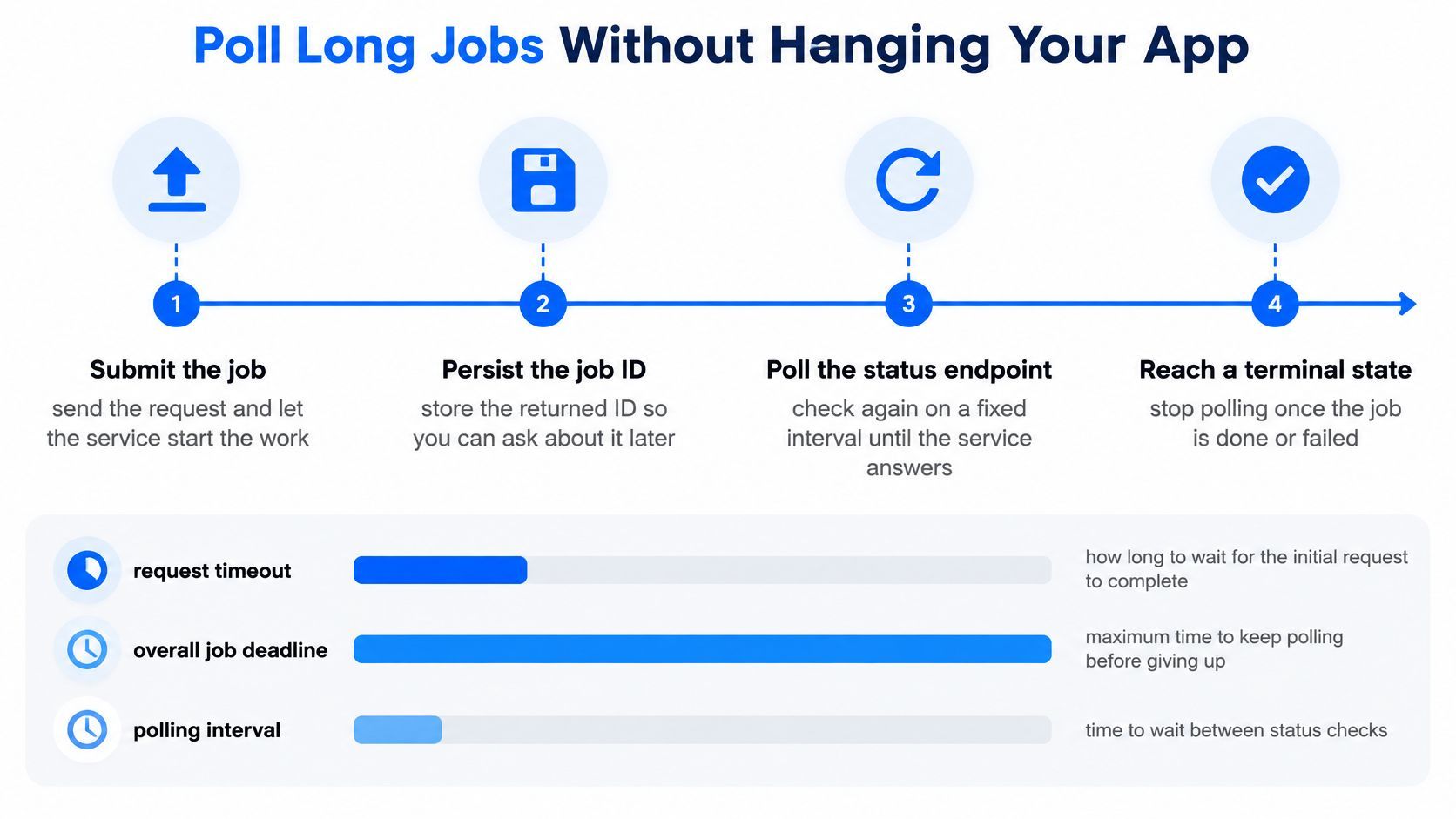
Unbounded polling hurts both sides of the wire. It inflates request volume, keeps browser tabs open, and can pin serverless workers until the invocation limit ends them. Enforce three separate deadlines in your client: one timeout for the initial submission request, one per-request timeout for each status poll, and one overall job deadline that stops polling even if individual status checks keep returning 200 OK. MDN's Using the Fetch API guide covers the fetch and cancellation primitives you can use to build those controls.
Backoff Schedule and Cancellation with AbortController
Fixed one-second polling is easy to write and unpleasant to operate. At scale, clients wake up together and turn status checks into a self-inflicted load test. Use bounded exponential backoff with jitter, so each client adds a small random offset before retrying.
Here is a worked polling schedule starting at 2 seconds, doubling each attempt, and capping at 30 seconds until the overall job deadline arrives:
| Poll number | Wait before poll | Elapsed time |
|---|---|---|
| 1 | 2 s | 2 s |
| 2 | 4 s | 6 s |
| 3 | 8 s | 14 s |
| 4 | 16 s | 30 s |
| 5 | 30 s (capped) | 60 s |
| 6 | 30 s (capped) | 90 s |
Pair the loop with AbortController so users can cancel a download or leave the page without leaving orphaned network calls behind. When you call controller.abort(), fetch rejects its promise with an error whose name is AbortError. In the catch block, check if (error.name === 'AbortError') first and exit cleanly. An intentional cancellation should not appear as a red network-error toast.
For a quick visual walkthrough of wiring up AbortController and timeout signals with fetch, watch this short video demonstration.
Once polling reaches a completed state, store the final HTTPS download URL as temporary data rather than as a permanent CDN link. Keep the job ID and completion status in your own record, and refresh the URL from the API when your workflow needs a current link. When moving large video files, stream the response body straight to disk or object storage instead of buffering the entire file into browser memory with response.arrayBuffer().
Poll short interactive jobs from the browser only when the user is actively waiting. Move long batch imports to a server-side worker, a job queue, or a webhook so no browser tab polls for hours.
Webhooks are the better fit for background jobs because they remove the polling loop. Vid Kraken webhook deliveries are signed with your API key so your receiver can verify authenticity, and failed deliveries are retried with exponential backoff for up to 10 attempts, about 4 hours in total. Webhook URLs must be public https:// or http:// addresses. Loopback, private-network, and single-label hostnames are rejected with a 400 error.
Retry Only Requests That Are Safe to Repeat
Automatic retries feel like free reliability until a network blip causes your client to submit the same download job twice. Safe retry logic is built around HTTP idempotency, not just status codes or caught exceptions.
RFC 9110 defines an idempotent method as one whose repeated identical requests have the same intended effect on the server, and explicitly notes that a client may retry an idempotent request after a communication failure when it couldn't read the response. That rule draws a bright line between read endpoints and job-creation endpoints in your JavaScript client.
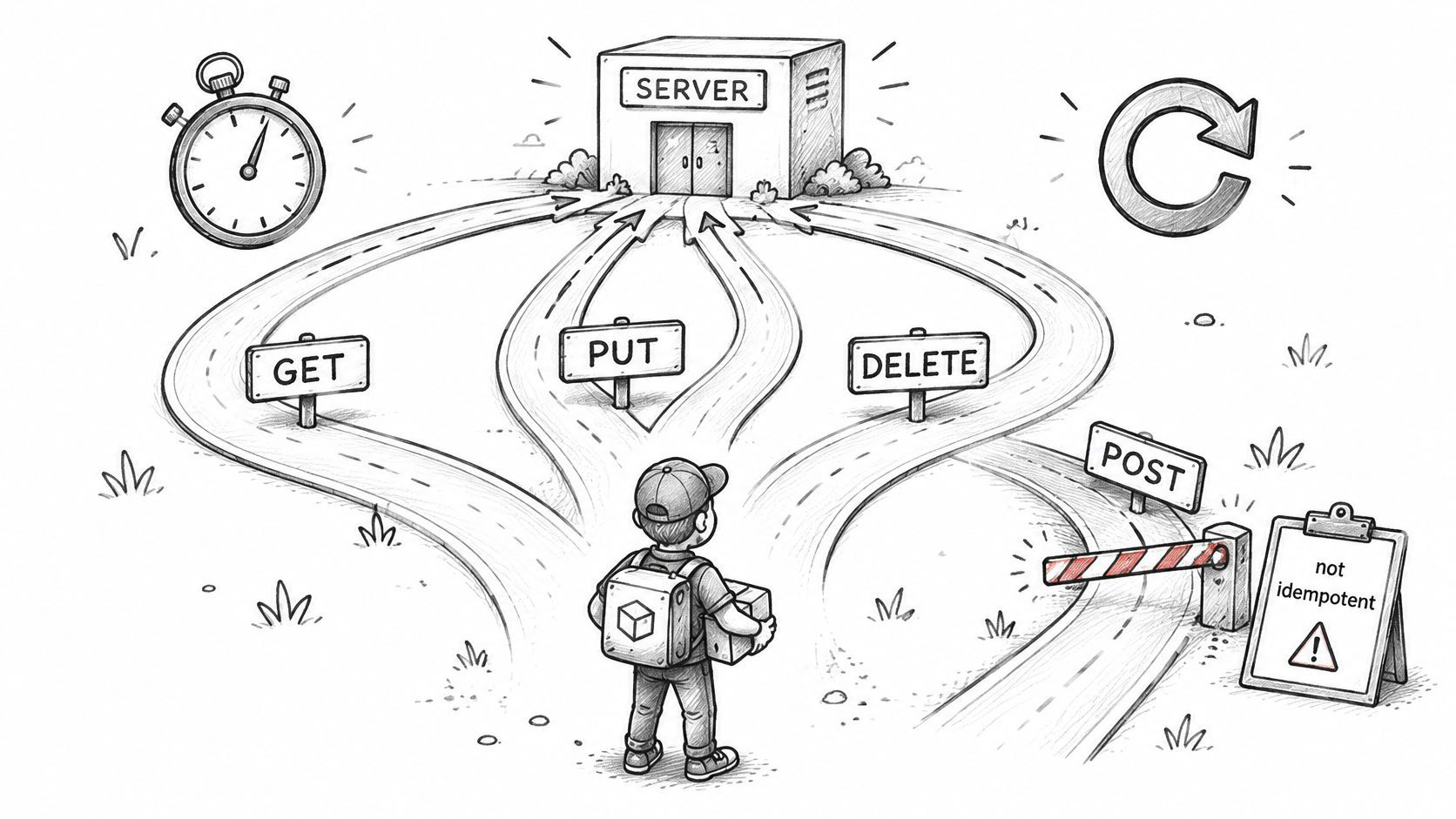
Metadata GET calls and job-status GET polls are safe to retry after timeouts, connection resets, and selected 5xx responses. A job-creation POST is different: your socket can time out after the server accepted the payload and started downloading the video. Blindly resubmitting that POST spawns a duplicate download and triggers a second bandwidth charge for the same asset.
| Request type | Safe to retry after a timeout? | What to do instead |
|---|---|---|
| GET metadata or GET job status | Yes | Retry with jittered exponential backoff and a cap |
| POST job creation without a provider idempotency key | No, may create a duplicate | Persist a client request ID and reconcile it through a lookup before any resend |
| POST job creation with a provider idempotency key | Yes, with the same key | Check the API docs before relying on it |
| Terminal content restriction | No | Stop and report the restriction to the user |
How to Reconcile a Timed-Out POST
Before firing a job-creation POST, generate a unique client request identifier and save it to your local database with a "pending_submission" state. If the HTTP call times out or drops mid-flight, don't immediately resend. Query a lookup endpoint (after confirming in the provider's documentation that one exists for your client ID) or inspect your provider's idempotency key support; only send a fresh POST if reconciliation proves no job was created.
Central pitfall: A dropped connection or client timeout never proves the server failed to execute your request. It only proves your client didn't receive the reply.
Five Rules for Every Retry Loop
Apply these five constraints across your HTTP wrapper so transient faults recover gracefully without amplifying outages:
- Retry only idempotent reads or reconciled writes. Never put raw job-creation
POSTcalls inside a blind retry middleware unless the endpoint explicitly documents idempotency keys. - Back off exponentially with jitter. Give struggling upstream services breathing room by widening the delay between attempts and randomizing the wait slightly so retries don't stampede in sync.
- Honor the
Retry-Afterheader whenever present. If a429or5xxresponse specifies a wait window in seconds or an HTTP date, pause for at least that duration instead of using your local timer. - Cap both attempt count and total elapsed time. A retry loop that allows five attempts with a 30-second socket timeout each can stall a request handler for two and a half minutes if you don't enforce a hard overall ceiling.
- Never retry deterministic
4xxerrors. Invalid formats, unsupported resolutions, bad API keys, and content restrictions will return the exact same error every time you resend them.
Finally, wire up clean observability before going live. Record the request ID and error code on every failure, and track separate counters for submission failures, polling failures, user cancellations, and terminal content errors. Splitting those four metrics lets you see within minutes whether a spike came from a flaky network path, duplicate submission bugs, or users pasting private links.
Test One Request Before You Ship Your Integration
JavaScript sits at the center of modern API work, and choosing between raw fetch and a typed SDK comes down to the size of your codebase. According to Stack Overflow's 2025 Developer Survey, which recorded 31,771 responses, 66% of all respondents used JavaScript extensively during the previous year, making it the most-used programming language in the survey, while 43.6% used TypeScript. That split mirrors the architectural choice developers face when integrating an API with JavaScript.
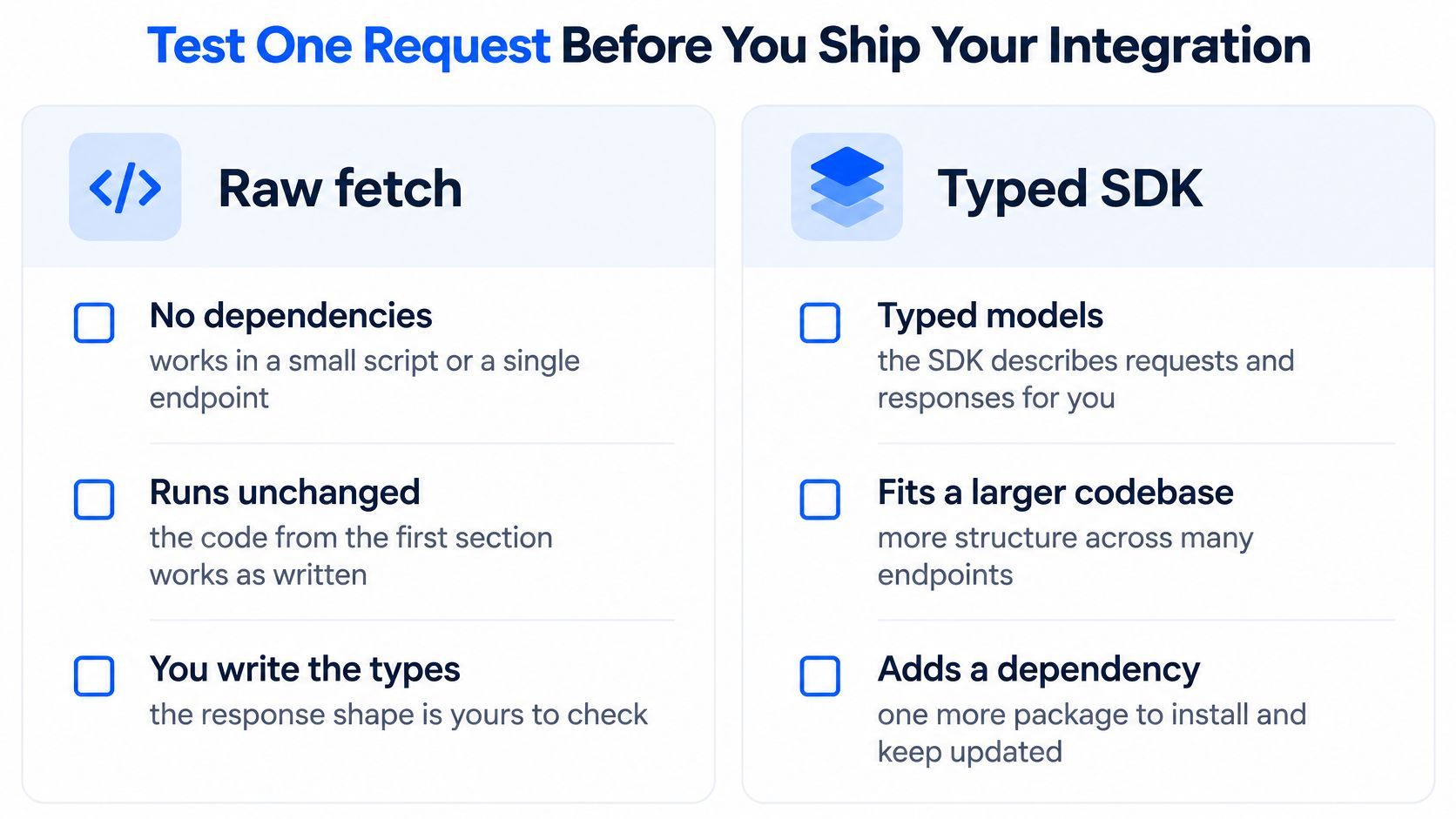
Raw fetch adds zero npm dependencies, keeps bundles tiny, and suits a small automation script or a service touching just one or two endpoints. You own the request headers, validation helpers, and TypeScript interfaces yourself.
A typed SDK earns its dependency slot once your codebase spans multiple endpoints, shared authentication, and structured error handling across a team. Vid Kraken publishes official JavaScript/TypeScript and Python clients (installable via npm install vidkraken and pip install vidkraken) alongside a CLI and an OpenAPI specification on GitHub, and creating an API key is free to start with no credit card required. If you want to see a complete client wired end to end before choosing your approach, walk through this full API integration example. Teams connecting media pipelines into broader operational workflows, such as scheduling and AI auto-reply automation, rely on these same typed contracts and explicit error paths to keep background jobs predictable.
Pre-Launch Verification Checklist
Run every item below against one real video before building the rest of your product UI or worker fleet. Each test exercises a specific production failure mode:
- Verify credentials with
GET /me: Confirm the endpoint returns200 OKand lists the exact account and plan you expect. - Complete one short download end to end: Submit a brief public clip, persist its job ID, poll until completion, and confirm both file size and a working HTTPS download URL arrive.
- Trigger a terminal content restriction: Submit a known private or age-restricted video and verify your client stores the machine-readable error code, stops immediately, and renders a clear user message without retrying.
- Abort a job mid-poll: Cancel an active poll with
AbortControllerand confirm yourcatchblock catchesAbortErrorcleanly without logging a false system outage. - Simulate a submission timeout: Force a short timeout on job creation and confirm your client reconciles the saved request ID instead of blindly creating a duplicate download.
- Check your concurrency guard: Confirm your worker queue throttles submissions so your account stays comfortably below its active concurrent download cap.
Pass all six checks on one real video first, and you'll ship an integration that handles slow jobs, restricted content, and flaky networks without waking up your on-call engineer.
If you're building a SaaS feature, AI transcription workflow, or media pipeline that needs reliable YouTube downloads without managing cookies, proxies, or bot checks yourself, Vid Kraken gives you a clean REST API, typed JavaScript and TypeScript SDK, and signed webhooks you can test right away. Create a free API key with no credit card required and try your first GET /me request at Vid Kraken.